Celigo NetSuite Integration ROI: Reducing Manual Data Entry and Streamlining Month-End Close

Table of Contents

Quick Answer

A Celigo NetSuite integration can deliver ROI by reducing manual data entry, minimizing reconciliation errors, and improving month-end close efficiency. Actual savings depend on transaction volume, labor costs, integration complexity, and ongoing subscription fees. Businesses can estimate payback by comparing the cost of existing manual processes against implementation and operating expenses.

Introduction

 For ecommerce businesses using NetSuite, storefronts, payment gateways, and CRM platforms generate a constant flow of financial transactions. When these systems are not integrated, finance teams must manually transfer and reconcile orders, payouts, and sales records. This increases the risk of errors, delays month-end close, and makes financial reporting more difficult.

A Celigo NetSuite integration connects these systems to NetSuite, automating transaction flows and helping finance teams focus on exceptions rather than routine data entry. This guide explains how to evaluate integration ROI, estimate potential savings, compare alternatives, and plan an implementation.

What Is Manual Data Entry Actually Costing Your Finance Team?

The cost goes well beyond the hours on a timesheet. It shows up in four areas a CFO is directly accountable for:

  • Close speed: every manually entered batch has to be checked before the period locks, which pushes financial reporting later each month.
  • Reporting confidence: fees, refunds, and chargebacks entered by hand create gaps between what the gateway paid and what NetSuite shows.
  • Cash visibility: unmatched payouts and unrecovered gateway fees sit unnoticed until someone reconciles them.
  • Headcount pressure: as order volume grows, the default fix becomes another hire instead of a better process.

These costs are not always visible as separate line items, so they often go unaddressed until month-end close delays or reporting errors become recurring problems.

How Does a Celigo NetSuite Integration Pay for Itself?

It pays for itself by removing the finance work that grows with transaction volume. Once orders, payouts, and deals post to NetSuite automatically, revenue growth no longer results in a matching increase in the finance workload.

The return comes from four levers:

  • Automated order-to-cash: Celigo connects NetSuite with ecommerce, CRM, and payment platforms such as Shopify, Amazon, Salesforce, and Stripe. Configured integration flows can automatically create or update transactions in NetSuite, reducing manual entry.
  • Payout reconciliation: Configured Celigo flows can transfer payment, refund, and fee data into NetSuite to support reconciliation. Depending on the payment platform and integration setup, teams can identify mismatches and investigate unsettled transactions more efficiently.
  • Fewer errors reaching close: Celigo provides error monitoring, retry capabilities, and tools for investigating failed records. These features help teams identify and resolve integration issues before they affect month-end reporting.
  • Continuous close readiness: sales, payment, and billing data stays current all month, so close becomes a review of the few records that do not match.

You May Also Like: Data Migration Strategies: NetSuite Lessons Learned

How Do You Build the ROI Case for a Celigo NetSuite Integration?

Compare the annual cost of the manual work the integration removes against its total cost over three years. Use your own baseline for each driver:

  1. Entry hours saved: monthly transaction volume multiplied by minutes per manual entry and your loaded hourly rate.
  2. Rework avoided: monthly errors multiplied by the time to find, correct, and re-post each one.
  3. Close days recovered: days cut from close multiplied by the daily cost of the finance staff involved.
  4. Cash impact: earlier invoicing and recovered gateway variances.
  5. Total cost: Celigo subscription, implementation, and internal admin time.

Celigo offers quote-based pricing across its Standard, Professional, and Enterprise editions. Costs depend on integration requirements, including endpoints, flows, and platform capabilities. Businesses should confirm subscription limits, implementation expenses, and ongoing maintenance costs when estimating ROI.

Example: Calculating Potential Integration Savings

A business processing 5,000 transactions monthly spends approximately $8,750 on manual data entry, assuming three minutes per transaction at $35 per hour. Automating 75% of this work could save $78,750 annually. After an illustrative $18,000 implementation cost and $24,000 in annual operating expenses, the first-year net benefit could reach $36,750, provided the labor savings are fully realized.

Calculate the ROI of Your NetSuite Integration

Identify opportunities to reduce manual work, improve reconciliation, and lower integration costs with guidance from AlphaBOLD's NetSuite consultants.

Request a Consultation

How Does Celigo Compare With Custom Scripts and Other Platforms?

For businesses using NetSuite as their system of record, Celigo can be a practical option for connecting ecommerce, CRM, and payment platforms. However, the right approach depends on integration complexity, existing infrastructure, and long-term maintenance requirements.

Option Best for Trade-off for finance
Custom scripts or point-to-point connectors
One or two simple flows
Depends on a single developer, breaks quietly when APIs change, limited error visibility
Enterprise iPaaS (Boomi, MuleSoft)
Complex, multi-ERP architectures
Longer build cycles and higher cost for NetSuite-centered needs
Celigo
NetSuite plus ecommerce, CRM, and payment apps
Quote-based pricing; complex logic still benefits from an experienced partner

What Do Celigo's 2026 Releases Mean for Finance Leaders?

They reduce the ongoing effort of running integrations and make your NetSuite data easier to use with AI tools your team already approves. Three updates stand out:

  • Celigo Ora: Now generally available, Celigo’s AI assistant helps administrators build integration flows, troubleshoot errors, and manage configurations using natural language, with changes subject to approval.
  • Claude and ChatGPT connectivity: Celigo Platform MCP allows compatible AI assistants, including Claude and ChatGPT, to connect with Celigo for integration monitoring, troubleshooting, and workflow management.
  • NetSuite REST API support: Celigo introduced NetSuite REST API support, providing another option for connecting NetSuite as businesses prepare for the eventual retirement of SOAP web services.

You May Also Like: NetSuite AI Connector Service: How It Works

What Does a Low-Risk Celigo Rollout Look Like?

A low-risk rollout starts with one high-value flow and proves results before expanding. A typical phased approach:

  1. Assess: map every system that creates financial transactions, your current close timeline, and where errors originate.
  2. Prioritize: choose the flow with the highest volume and rework, usually order-to-cash or payout reconciliation.
  3. Configure and test: set up prebuilt apps and mapping rules for tax, currency, and subsidiaries, then run in parallel for one close cycle.
  4. Measure: compare hours, errors, and close days against your baseline.
  5. Expand: use those results as the business case for the next flows.

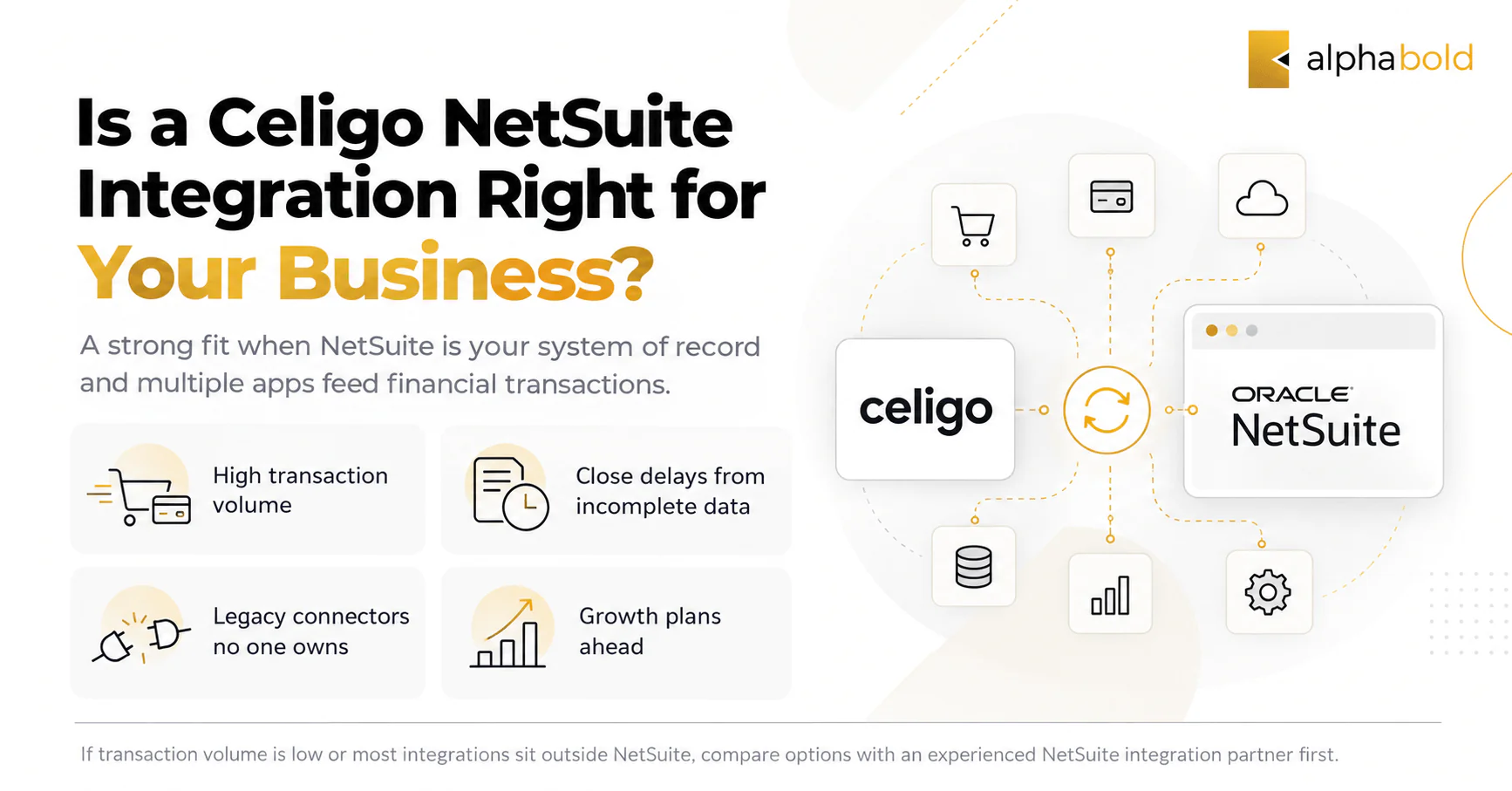
Is a Celigo NetSuite Integration Right for Your Business?

It is a strong fit when NetSuite is your system of record and several applications feed it financial transactions. Clear signals include:

  • High transaction volume from ecommerce channels, marketplaces, or multiple payment gateways
  • A close that regularly slips because data arrives late or incomplete
  • Legacy scripts or connectors that nobody fully owns
  • Plans to add subsidiaries, channels, or acquisitions in the next 12 to 24 months
Infographic showing four signs a Celigo NetSuite integration may be right for your business: high transaction volume, month-end close delays, outdated connectors, and business growth plans

If your volume is low or most integrations sit outside NetSuite, compare options with an experienced NetSuite integration partner first.

Plan Your NetSuite Integration With AlphaBOLD

From evaluating integration requirements to configuring and testing workflows, our NetSuite consultants can help you implement an integration approach that fits your business needs.

Request a Consultation

Conclusion

For ecommerce businesses using NetSuite, manual transaction processing can increase costs, delay reconciliation, and complicate month-end close. Celigo helps automate these workflows, allowing finance teams to spend less time on routine data entry and more time resolving exceptions.

The key is to identify where automation delivers measurable savings and weigh those benefits against implementation and ongoing costs. AlphaBOLD’s NetSuite consultants can help you evaluate these opportunities, build a practical business case, and implement integrations that deliver measurable value.

Frequently Asked Questions

How long does a Celigo NetSuite integration take to implement?

Implementation timelines depend on the number of connected systems, customization requirements, data quality, and testing scope. Prebuilt integrations generally require less configuration than complex, multi-subsidiary workflows.

How soon can we expect to see a return?

Businesses can begin measuring time savings, error reduction, and reconciliation improvements during the first few close cycles after implementation. Actual payback depends on the savings achieved relative to subscription, implementation, and maintenance costs.

Does Celigo replace NetSuite's Account Reconciliation or close tools?

No. Celigo moves and validates data entering NetSuite, while NetSuite’s close and reconciliation tools work on data once it is there. Most teams use both together.

What internal resources will we need?

Usually a finance process owner and a NetSuite administrator. An implementation partner handles configuration, mapping, and testing.

Can Celigo connect NetSuite with Claude or ChatGPT?

Yes. As of the July 2026 release, Celigo’s AI Agent supports Claude, OpenAI, and Gemini models, and its MCP server lets Claude and ChatGPT work with your Celigo account.

Explore Recent Blog Posts

270x330

Related Posts

Receive Updates on Youtube
Copyright © 2025 AlphaBOLD | NetSuite Solution Provider | All Rights Reserved | Privacy Policy