NetSuite Expense Analysis: How to Find the Real Drivers Behind Rising Costs

Table of Contents

Introduction

Most finance teams can see when expenses are up. NetSuite makes that part easy. Run the P&L, compare periods, and the variance is right there. But the number alone does not explain what changed. Effective NetSuite expense analysis starts when finance teams move beyond the variance and ask what actually caused the increase. Was it higher transaction volume, vendor price changes, delayed approvals, accrual timing, or uncontrolled departmental spend?

That distinction matters because each driver requires a different response. A timing issue needs a cleaner close process. A vendor-driven increase may require renegotiation. A department-level spending pattern may point to control gaps. This guide walks through a structured approach to NetSuite expense analysis that helps finance teams identify the variance, diagnose the cause, and decide what to do next.

What Are the Most Common Causes of Expense Increases in NetSuite?

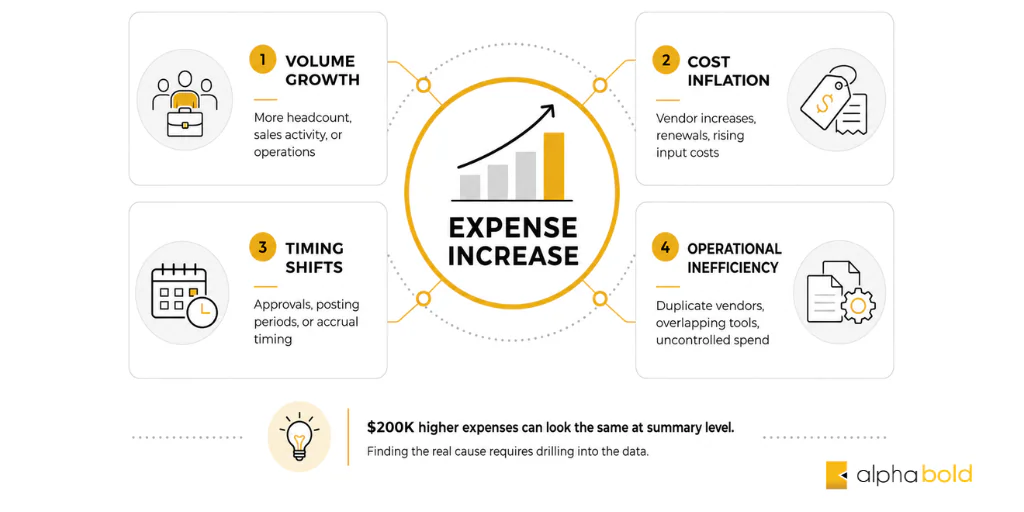
In most cases, higher expenses trace back to one of four drivers:
  • Volume growth: more headcount, higher sales activity, expanded operations
  • Cost inflation: vendor price increases, contract renewals at higher rates, rising input costs
  • Timing shifts: approval workflows, posting periods, or accruals moving costs across periods
  • Operational inefficiency: duplicate vendors, overlapping tools, uncontrolled departmental spend
The challenge is that all four can look identical at a summary level. A $200K increase in operating expenses does not tell you which of these is happening. That requires drilling into the data with a clear framework.
Common Causes of Expense Increases in NetSuite

How Do You Start NetSuite Expense Variance Analysis?

Start a NetSuite expense analysis by isolating where the change is happening, not why.

Run a comparative P&L view: this quarter versus last quarter, or current quarter versus the same period last year. The goal at this stage is to narrow the variance to a handful of accounts. You are reducing noise, not solving anything yet.

Once you have identified which accounts changed materially, the analysis breaks into two questions:

Did the number of transactions increase?

Or did the cost per transaction increase?

That distinction drives everything that follows. If transaction volume went up, you are most likely dealing with growth or increased operational activity. If volume held steady but total spend increased, the issue is almost always pricing, vendor changes, or contract renewals.

How Does NetSuite Segmentation Help Identify Expense Drivers?

Department, class, and location segmentation typically surfaces the root cause quickly.

What appears to be a company-wide cost increase is often limited to a single team or function. Breaking the data down by department or class usually confirms this within minutes. Once you identify the source, the question shifts from “why are expenses up across the business?” to “why is this specific team spending more?” which is a far more actionable question to bring to leadership.

Vendor-level detail matters just as much. Increases are frequently concentrated among a small number of suppliers. Either they raised prices, or the business became more dependent on them. Both scenarios require different responses, renegotiation versus vendor consolidation, but neither is visible without drilling into transaction-level data.

This is where NetSuite’s saved searches and custom segments become genuinely useful. Standard reports rarely surface this level of detail without configuration.

Fix Expense Variance Issues in NetSuite

If your team can see the variance but cannot explain the driver, the issue is usually configuration, not capability. AlphaBOLD helps finance teams structure NetSuite reporting, segmentation, and saved searches, so expense analysis becomes repeatable.

Talk to a NetSuite Expert

How Does Budget vs Actual Reporting in NetSuite Fit Into Expense Analysis?

Budget vs actual reporting in NetSuite is not about whether the budget was right. It is about understanding the gap between what was planned and what happened.

If actual spending is significantly above budget, there is usually a breakdown in one of three areas: planning accuracy, execution discipline, or spend controls. Each requires a different response.

This view is also useful for separating one-time costs from recurring spend. A large implementation, a one-time project cost, or an unusual vendor payment can significantly distort a single quarter. If those are not isolated and flagged, it is easy to assume there is a structural cost problem when the quarter is actually an outlier.

Bonus Reading: Bridging the Gap Between Budgeting and Real-Time Insights

What Is the Difference Between a Timing Issue and a Real Expense Increase?

In NetSuite financial analysis, approval workflows, posting period settings, and accrual timing can all shift when an expense appears in the financials. A cost that should have landed in Q3 may appear in Q4 due to a delayed approval or period-end posting rules.

If this is not identified early, it leads to unnecessary escalations and incorrect conclusions. The fix is not a cost-reduction initiative; it is a reporting and period-close discipline issue.

A simple way to test for this in NetSuite: compare transaction dates with posting dates for the accounts showing the variance. If those are consistently misaligned, you have a timing problem, not a spending problem.

How Do You Identify Operational Inefficiency in NetSuite Expense Data?

Inefficiency rarely stands out in a single report. A proper NetSuite expense analysis requires finance teams to actively look for operational patterns that drive unnecessary spending.

Common patterns to flag:

  • Multiple vendors providing the same or overlapping services
  • Departmental subscriptions that duplicate centrally-managed tools
  • Frequent small purchases that bypass standard procurement controls
  • Approval patterns showing rubber-stamping rather than genuine review

Saved searches in NetSuite are the most effective tool for this. Build a search that groups spending by vendor category, then identify overlaps. Build another that surfaces high-frequency, low-value transactions by department. These patterns are invisible in summary reports but obvious once the data is structured correctly.

Bonus Reading: Real-Time Finance: Why Monthly Reports are Becoming Obsolete

Identifying inefficiency is also where NetSuite’s class and department tagging structure becomes valuable for NetSuite expense analysis. If your chart of accounts and tagging structure are clean, this analysis takes hours, not days.

Infographics show thatInfographics show that NetSuite user guide

User Guide for NetSuite Pricing: All You Need to Know

All you need to know about NetSuite pricing! Explore our user guide for comprehensive insights.

Download Guide

What Should Finance Leaders Do After Identifying the Cause?

Identifying the variance is step one. The value is in what happens next.

Each driver type points to a different action:

Expense Driver Primary Response
Volume growth
Assess margin and efficiency — is revenue keeping pace?
Cost inflation
Initiate vendor review or contract renegotiation
Timing mismatch
Address period-close process and posting discipline
Operational inefficiency
Implement controls, consolidate vendors, review approvals

Too many finance teams stop at identifying and explaining the increase at a summary levuel in NetSuite cost management. That is reporting. Leadership means assigning ownership, deciding on a response, and following through.

If expenses are up because the business is growing, the conversation is about efficiency and return on that spend. If it is vendor-driven, it belongs in procurement. If it is a timing issue, it is a process fix. If it is inefficiency, it is a control problem.

None of those conclusions comes from a summary report.

Is Your NetSuite Setup Built for Analysis or Just Recordkeeping?

Understanding why expenses are higher is the first step. Building the reporting structure that makes that analysis repeatable is the next step. AlphaBOLD can tell you the difference in a single conversation.

Request a Demo

Conclusion

Higher expenses are not the problem. Not knowing why they are higher and not acting on that understanding is.

NetSuite gives you the data. The value of NetSuite expense analysis comes from how you structure the analysis: isolating the variance, separating the drivers, segmenting by department and vendor, and moving from explanation to decision.

Finance teams that consistently do this well are not just better at reporting. They are faster at identifying margin pressure, more credible in leadership conversations, and better positioned to control costs before they compound.

FAQs

Why do expenses look higher in NetSuite even when spending has not changed?

Expenses may look higher because of timing issues rather than actual spend increases. Delayed approvals, accrual reversals, posting period changes, or transactions entered after the close can shift costs into a different period. Finance teams should compare transaction dates with posting dates to confirm whether the increase is real or timing-related.

Why is department-level expense reporting unreliable in NetSuite?

Department-level reporting is often unreliable when transactions are not tagged consistently by department, class, location, vendor, or project. If the underlying data structure is inconsistent, reports may show spend in the wrong area or hide the real source of the variance. Clean segmentation is essential for accurate NetSuite expense analysis.

How can NetSuite help identify vendor-driven cost increases?

NetSuite can help finance teams compare vendor spend across periods, review average cost per transaction, and identify suppliers with unusual increases. If spending rises while transaction volume stays the same, the issue may be vendor pricing, contract renewals, or greater dependency on a specific supplier.

Why does budget vs actual reporting in NetSuite not explain the cause of a variance?

Budget vs actual reporting in NetSuite shows the gap between planned and actual spending, but it does not always explain why the gap exists. To find the cause, finance teams need to review transaction-level details, vendor activity, department-level spend, timing differences, and recurring versus one-time costs.

How do finance teams separate one-time costs from recurring expenses in NetSuite?

Finance teams can separate one-time costs by tagging non-recurring transactions through memos, custom fields, project codes, or expense categories. Once these items are identified, they can be filtered out of reports to give leadership a clearer view of baseline recurring spend.

At what point should we bring in external support for expense analysis?

External support is useful when finance teams can see expense variances but cannot explain them quickly or consistently. This usually points to gaps in reporting, segmentation, saved searches, approval workflows, or system configuration. A NetSuite partner can help structure the system so expense analysis becomes repeatable instead of manual.


Explore Recent Blog Posts

Related Posts

Receive Updates on Youtube
Copyright © 2025 AlphaBOLD | NetSuite Solution Provider | All Rights Reserved | Privacy Policy