

Table of Contents
Introduction
In field service, reputation is everything. A delayed appointment, missing parts, or a poorly informed technician can quickly erode customer trust and put long-term relationships at risk. Clients expect fast resolutions, clear communication, and reliable outcomes every time. For companies, meeting those expectations is not only about maintaining customer satisfaction, it is about protecting revenue and safeguarding brand credibility.
This is why field service management has become a priority in digital transformation initiatives. Businesses need systems that connect office staff and field teams, automate routine tasks, and give technicians the tools to perform effectively on site. NetSuite Field Service Management delivers on those needs by streamlining scheduling, enhancing communication, and equipping teams with mobile access to real-time data. With the right platform in place, organizations can reduce inefficiencies, improve service quality, and strengthen the customer relationships that drive growth.
How Can NetSuite Help You Manage Field Services?
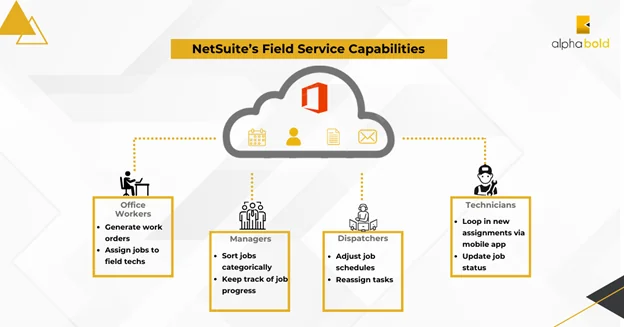
Coordinating between office staff, dispatchers, and technicians can be difficult without a connected system. Miscommunication or scheduling delays often translate into missed appointments, higher costs, and frustrated customers. NetSuite Field Service Management simplifies this by centralizing field operations and giving every role the tools they need to work more effectively.
Key ways NetSuite supports field service teams include:
- Office Staff: Create and assign work orders tied to cases, sales orders, or projects, ensuring jobs are linked directly to business processes.
- Dispatchers: Use a drag-and-drop scheduling board with color-coded statuses to assign technicians based on skills, location, and availability.
- Technicians: Access real-time job details, customer history, and directions through the mobile app, while updating status, logging parts, and capturing signatures on site.
- Managers: Track utilization, profitability, and service quality with reporting tools that provide visibility into field operations.
By connecting the office and the field, NetSuite reduces inefficiencies, improves service quality, and helps businesses strengthen customer trust.
Key Features of NetSuite Field Service Updates
NetSuite Field Service Management continues to evolve with updates that make daily operations more efficient and easier to manage. The focus is on giving teams practical tools that reduce manual work, improve accuracy, and strengthen service delivery. Key highlights include:
1. Automatic Time Bill Creation:
Time tracking is now automated. Captured start and end times are used to generate time bills, reducing errors and freeing managers and technicians from repetitive tasks.
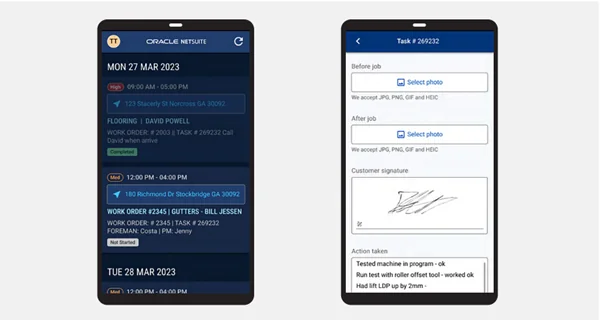
2. Bulk File Upload in the Mobile App:
Technicians can upload multiple photos or documents at once, making job documentation quicker and more reliable. This improvement speeds up reporting and ensures details are captured in full.
3. SuiteApp Configuration Preview and Fixes:
Recent SuiteApp updates introduced a configuration preview and interface improvements. These refinements simplify setup and create a more stable experience for users.
4. Billable vs. Payroll Hour Separation:
The latest SuiteApp updates include a configuration preview and interface refinements that simplify setup and create a smoother, more stable user experience.
Together, these features remove friction from field service operations and give businesses a more reliable way to deliver consistent results while protecting time and resources.
Optimize Your Field Service Operations with NetSuite
Discover how AlphaBOLD can tailor NetSuite Field Service Management to your unique workflows and help your teams deliver consistent, high-quality service.
Request a DemoWhat’s Next for Field Service Management?
The latest updates to NetSuite Field Service Management are not just incremental improvements, they are steps toward the future of service delivery. Companies are moving away from reactive work and toward proactive, connected operations. NetSuite is building the foundation for that shift by weaving advanced technologies into its platform. Key directions include:
1. AI-Driven Scheduling in Practice:
NetSuite’s smarter scheduling tools are already reducing travel time and improving job assignments. As AI becomes more deeply embedded, these tools will anticipate resource needs and balance workloads automatically.
2. IoT and Asset Tracking:
With asset management and real-time updates built into NetSuite, businesses are positioned to connect IoT-enabled equipment monitoring directly into service workflows. This helps organizations transition toward predictive maintenance.
3. Predictive Insights:
Reporting and analytics in NetSuite give managers visibility into technician performance, job profitability, and recurring issues. These insights lay the groundwork for predictive analytics that can help anticipate demand and prevent service failures.
4. Evolving Mobile Experience:
NetSuite’s mobile app continues to gain improvements such as bulk file upload and faster syncing. These features reflect a larger shift toward mobile-first service management, where technicians can perform every task directly from the field.
By tying today’s updates to tomorrow’s needs, NetSuite shows that its Field Service Management solution is not only designed to solve current challenges but also to prepare organizations for the next phase of service innovation.
Further Reading: NetSuite Implementation Pricing Guide and Cost of Ownership
Align Technology with Your Service Goals
Work with AlphaBOLD to configure scheduling, mobile tools, and reporting in a way that drives measurable results for your organization.
Request a DemoFrequently Asked Questions about NetSuite Field Service Management
How does NetSuite FSM support predictive or proactive service models?
While NetSuite FSM focuses on scheduling, dispatch, and asset tracking, it integrates with IoT data and analytics to support predictive maintenance. This means organizations can connect sensor data and asset monitoring directly into service workflows to address issues before they cause downtime.
Can NetSuite FSM handle complex scheduling needs across multiple regions or service lines?
Yes. The scheduling board allows dispatchers to assign jobs based on skill sets, availability, and geographic location. Recent updates also introduced smarter automation that helps reduce scheduling conflicts and ensures efficient allocation of resources.
How does NetSuite FSM integrate with other NetSuite modules?
Field service management connects seamlessly with NetSuite ERP, CRM, and inventory. This integration ensures that work orders, billing, and asset data flow into the same system as finance and sales, creating a single source of truth for operations.
What should businesses prepare for before upgrading to the latest FSM release?
Organizations should complete the required pre-upgrade checks, especially around license tracking and mobile app configurations. Working with a NetSuite partner can help minimize disruptions and ensure that new features are properly enabled for teams.

ERP Selection Checklist
Streamline your ERP selection process with our comprehensive checklist, ensuring you make informed decisions for your business's future success.
Learn more
How AlphaBOLD Helps with NetSuite Field Service Management?
Adopting NetSuite Field Service Management is most effective when it aligns with your company’s unique service processes. AlphaBOLD works with businesses to ensure that the solution is configured and supported in a way that drives measurable results. Our role goes beyond implementation:
- Process Understanding
We analyze your service workflows end to end, so the solution reflects how your teams actually work. - Tailored Configuration
Features such as scheduling, dispatching, mobile access, and asset tracking are adapted to your business requirements. - Training and Adoption
Role-specific training equips office staff, dispatchers, and technicians to use NetSuite FSM confidently and effectively. - Continuous Support
From troubleshooting to rolling out new features, our consultants provide ongoing support to keep your system running smoothly. - Advanced Development
Whether it’s integrations, automation, or reporting, our developers extend NetSuite FSM to address complex needs and maximize value.
With this approach, AlphaBOLD helps companies reduce inefficiencies, improve service quality, and strengthen customer trust through a system built for their goals.
Further Reading: Why Executives Should Consider NetSuite Business Consultants.
Build a Future-Ready Field Service Operation
AlphaBOLD’s consultants help you move beyond day-to-day fixes, ensuring your NetSuite FSM investment supports long-term growth and customer trust.
Request a DemoConclusion
Strong field service performance is no longer optional. Customers expect quick resolutions, clear communication, and consistent results, and companies that fall short risk damaging both revenue and reputation. NetSuite Field Service Management equips organizations with the tools to meet those expectations, from smarter scheduling and mobile access to automated billing and improved reporting.
With the right implementation partner, businesses can turn these capabilities into a competitive advantage. By streamlining operations and supporting technicians in the field, NetSuite FSM helps companies deliver reliable service today while preparing for the demands of tomorrow.
Explore Recent Blog Posts