

Table of Contents
Enterprise software has always promised efficiency. But until recently, “automation” mostly meant a stack of workflows, scheduled scripts, and reports that needed constant babysitting. With embedded AI agents inside NetSuite, your ERP is no longer just a system of record. It’s becoming a system of action.
If you’ve ever felt the gap between what your teams should be doing (analysis, strategy, customer conversations) and what they actually spend time on (re-keying data, reconciling transactions, double-checking exceptions), this guide is for you. Below, I’ll break down how NetSuite’s AI embedded AI agents work, where they deliver the biggest returns, and the practical steps to make them part of your day-to-day operations without creating risk or chaos.
What Exactly Are “Embedded AI Agents” in NetSuite?
Think of embedded AI agents as digital teammates that live inside your ERP. They’re not just glorified macros or static workflows. They’re adaptive, context-aware, and goal-oriented. Instead of waiting for you to push a button, these agents monitor what’s happening, surface what matters, and can take actions you approve, such as drafting journal entries, preparing purchase orders, or summarizing customer issues.
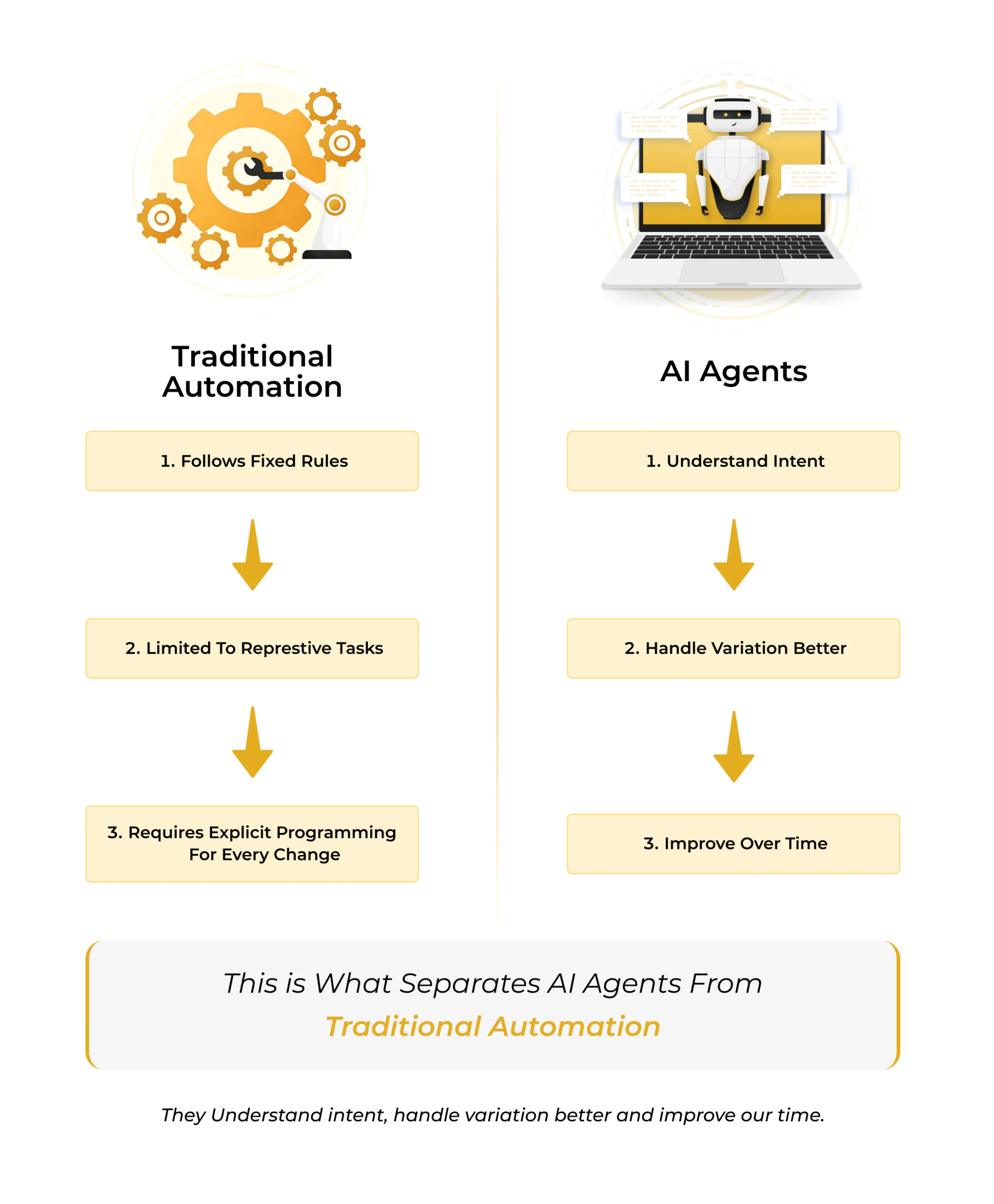
The big mindset shift is this: you’re not just telling NetSuite what to do, you’re telling NetSuite what you’re trying to achieve. NetSuite’s embedded AI agents then help close the gap between raw data and the outcome you want, continuously and quietly in the background. This is what separates AI agents from traditional automation: they understand intent, handle variation better, and improve over time.
Further Reading: How AI is Transforming ERP Workflows in 2026
Where AI Agents Deliver the Fastest ROI
You don’t need to overhaul your entire ERP to see results. Start in the operational “hot zones” where manual effort is high, exceptions are frequent, and the rules change often.
1) Financial Close & Reconciliation:
Month-end is a magnet for inefficiency. NetSuite’s embedded AI agents can automatically match transactions, flag unusual entries, and propose adjustments for review. Instead of a last-minute scramble, you get a rolling close: fewer surprises, faster cycle times, and a cleaner audit trail. Finance leaders benefit most when they set clear objectives for agents like increasing bank auto-match rate to 85%+ or reducing exception handling time by 30% and being able to track those metrics.
Quick wins:
- Bank transaction auto-matching and exception routing
- Drafting recurring accruals and reversals
- Detecting duplicate vendors, invoices, and payments
2) Document-Heavy Work (AP, AR, Procurement):
So much value is trapped in unstructured content. NetSuite’s AI embedded agents can read, extract, and classify information, then update records. This isn’t just OCR; agents can evaluate context, flag discrepancies against POs or contracts, and hand you the edge cases instead of the drudgery.
Quick wins:
- AP invoice capture with line-level accuracy
- Contract vs. invoice price variance alerts
- Auto-populating vendor records from onboarding documents
3) Inventory & Supply Chain:
Most reorder logic is too static for real-world volatility. AI agents can watch demand signals, vendor reliability, and lead-time variance, then draft purchase orders before a problem hits your fulfillment team. They can also give early warnings when suppliers drift on price or service levels.
Quick wins:
- Proactive PO drafts based on predictive demand
- Supplier performance monitoring with exception alerts
- Inventory health dashboards with recommended actions
4) Sales, CPQ & Customer Support:
Customer-facing teams need context, fast. NetSuite’s embedded AI agents can recommend configurations during quoting, summarize a customer’s full history before a call, and draft responses for support teams to edit and send. The result: faster cycle times and more consistent outcomes without adding headcount.
Quick wins:
- Guided product configuration with explain-why summaries
- Case summaries for handoffs and escalations
- Smart follow-ups and renewal nudges
5) Management Reporting & Narrative Insight:
Reports are only useful if someone reads them. Agents can generate short, plain-language narratives that call out what changed, why it matters, and what to do next. Executives get the signal over the noise, and teams recommend the next steps rather than a data dump.
Quick wins:
- Monthly financial narrative (variance, drivers, risks)
- Customer health snapshots for QBRs
- Sales pipeline shifts and forecast confidence notes
Turn NetSuite Data Into AI-Driven Insight
With NetSuite AI and BOLDinsight, AlphaBOLD helps businesses move beyond reporting to real intelligence. By analyzing ERP data across finance, operations, and sales, BOLDinsight delivers powerful AI ERP insights that highlight trends, uncover risks, and support better forecasting. The result is a smarter NetSuite environment that helps teams make faster decisions and continuously improve business performance.
Request a NetSuite AI BOLDInsight DemoImplementation Roadmap: From Pilot to Scale
Rolling out AI inside an ERP can feel intimidating. The key is to start small, prove value quickly, and scale in controlled increments. Here’s a practical, battle-tested approach.
Phase 1: Foundation & Readiness (2–4 Weeks):
- Pick two use cases with high manual effort and clear success metrics (e.g., bank reconciliations and AP invoice capture).
- Tighten data hygiene. Validate critical fields, standardize naming, archive unused forms/fields, and kill outdated workflows. AI amplifies whatever you feed it.
- Define guardrails. Decide which actions an agent can take autonomously (e.g., draft only) and which require approval (e.g., posting entries, vendor changes).
- Decide roles & approvals. Who reviews agent suggestions? What’s the SLA? Where are exceptions routed?
Success criteria: A short list of KPIs per use case (auto-match rate, time-to-close, exception volume, invoice cycle time), current baselines, and target improvements.
Phase 2: Pilot (4–8 Weeks):
- Promote low-risk actions to “auto.” For example, let the agent auto-match below a certain amount or auto-draft POs under a defined spend limit.
- Keep approvals for higher risk. Anything above thresholds still gets human review.
- Codify “If-this-then-that” review paths. When the agent flags a mismatch, who’s first responder AP, purchasing, or the business unit?
Success criteria: 60–80% human touch reduction on routine items, with exceptions handled within SLA.
Phase 3: Controlled Autonomy (4–6 Weeks):
- Turn on the agent with “assist” mode. Let it observe, summarize, and draft. Humans approve.
- Daily huddles for two weeks. Review agent suggestions, accept/reject quickly, and capture patterns behind rejections.
- Refine prompts and policies. Adjust thresholds, preferred vendors, routing rules, and exception definitions. This is where the agent learns your shop.
- Track outcomes. Publish a simple weekly dashboard: throughput, accuracy, time saved, and the top 3 recurring exceptions.
Success criteria: 20–40% cycle-time improvement in the pilot process, with error rates trending down week over week.
Phase 4: Scale & Extend (Ongoing):
- Clone the playbook into adjacent processes (e.g., from bank recs to intercompany, from AP to expense audits).
- Introduce cross-process agents. For instance, an agent that monitors order-to-cash end-to-end and pings the right owner at the right time.
- Quarterly controls review. Validate logs, access, and approvals with internal audit. Keep the auditors comfortable and the system compliant.
Governance: Move Fast, Don’t Break Things
You can move quickly without creating risk. Treat AI agents like you would a new hire in finance or operations with clear authority, visibility, and accountability.
- Principle of least privilege: Give agents only the access they need; expand gradually.
- Human-in-the-loop by default: Keep approvals in place until your error rate is consistently low.
- Audit everything: Require the agent to log source data, decisions made, and who approved what.
- Separation of duties: The person who configures an agent shouldn’t be the same person who approves financial outputs.
- Change control: Any material change to the agent’s scope, prompts, or thresholds should go through lightweight change management with rollback options.
Operationalize NetSuite’s Embedded AI Agents With AlphaBOLD
Deploying NetSuite’s embedded AI agents without guardrails can create risk. Deploying them with the right architecture, approval workflows, and performance tracking can transform finance, procurement, and sales operations. Our team helps you implement AI agents that accelerate outcomes while maintaining auditability and control.
Request a ConsultationDesigning Prompts and Guardrails That Actually Work
Great AI outcomes rarely come from out-of-the-box prompts. You’ll get better results if you teach your NetSuite embedded AI agent how your company speaks and what your policies are.
- Tone and structure: Provide examples of accepted narratives (“Short summary, then bullet points, then recommended action.”)
- Field standards: Specify which custom fields matter most and common pitfalls to avoid.
- Business rules: Encode things like “never change vendor bank details without two human approvals” or “do not create a PO if the vendor’s risk score > threshold.”
- Escalation paths: Tell the agent who to alert and how to summarize an issue for each role (AP manager vs. controller vs. buyer).
Tip: Keep a single “Prompt Library” with version control. When you find a phrasing that consistently yields great results, lock it in.
Metrics That Prove Real Value
Leaders don’t want AI for AI’s sake, they want outcomes. Measure and report on business impacts that matter.
Finance & Accounting:
- Days to close (overall and by entity)
- Auto-match rate and exception volume
- Time-to-resolution for exceptions
- Write-offs avoided and errors prevented
Procurement & Inventory:
- PO cycle time and supplier lead-time variance
- Stockouts and expedited shipping incidents
- Price variance against contract and savings realized
Sales & Service:
- Quote cycle time and win rate impact
- First-response and time-to-resolution
- NPS/CSAT trends and churn risk
Team Productivity & Quality:
- Hours saved per month per role
- Rework rate and defect density
- % of agent suggestions accepted on first pass
The best way to win internal support is to publish a simple, visual monthly “AI scorecard”: three KPIs that moved, two risks you’re tracking, and one new win you unlocked.
Common Pitfalls (and How to Avoid Them)
- Turning on too much at once. Start with two use cases, not ten. Nail the playbook, then scale.
- Dirty data and brittle workflows. AI can’t fix broken fundamentals. Clean field usage, remove dead customizations, and simplify approvals before you expand.
- No owner. Assign a product owner for each agent. Someone has to be accountable for outcomes, not just the setup.
- Vague success criteria. Define baselines and targets in writing. “Make AP better” isn’t a KPI.
- Shadow configuration. Lock prompts, thresholds, and rules in a controlled library.
The Cultural Shift: From Doers to Deciders
AI doesn’t remove people from the process; it removes the parts of the process that keep people from doing their best work. That shift takes intention:
- Train teams to review and approve, not re-create.
- Celebrate outcomes (“we closed two days faster”), not inputs (“we processed 2,000 invoices manually”).
- Reskill analysts to own agents, dashboards, and continuous improvement.
- Make time for retrospectives: what did the agent get right, and how can we help it do better next week?
The endgame is a higher-leverage team: less time on keystrokes, more time on judgment, negotiation, and strategy.
Further Reading: Change Management, Training & Best Practices to Maximize NetSuite ROI
A Practical Example of NetSuite’s Embedded AI Agents: AP Automation in Eight Weeks
- Weeks 1–2: Baseline invoice cycle time and exception categories. Clean vendor data, standardize terms, and define approval thresholds.
- Weeks 3–4: Enable the agent in assist mode. It extracts invoice data, cross-checks against POs, drafts bills, and routes exceptions. Humans approve.
- Weeks 5–6: Tweak prompts and rules based on rejections. Introduce low-risk auto-posts for small, recurring vendors.
- Weeks 7–8: Extend to contract variance detection and vendor performance summaries. Publish the “before vs. after” scorecard.
Expected outcomes: 30–50% cycle-time reduction, fewer late fees, cleaner accruals, and happier AP staff who spend time on exceptions.
Final Takeaway
Embedded AI agents in NetSuite are the most meaningful leap forward the platform has seen in years. They turn your ERP into an active participant in business watching, interpreting, and acting in real time so your team can operate at a higher level.
If you want quick impact with controlled risk:
- Pick two high-leverage use cases.
- Establish guardrails and a clear owner.
- Run a tight pilot with daily feedback.
- Promote low-risk tasks to autonomy.
- Measure and publish the wins.
Do this, and your ERP stops being a place you go to look up what happened. It becomes a system that helps you make things happen faster, more accurately, and with less stress on your team.
Frequently Asked Questions
1. How long does it take to implement NetSuite’s embedded AI agents in a live environment
A: Implementation timelines typically range from 6 to 12 weeks, depending on data readiness, use case scope, and governance requirements. Most organizations begin with one or two high-impact workflows such as bank reconciliations or AP invoice automation.
The first phase focuses on data hygiene, role definition, and guardrails. From there, teams run a controlled pilot in assist mode before promoting low-risk actions to autonomy. A phased rollout ensures measurable improvements without disrupting existing financial controls.
2. Can NetSuite’s embedded AI agents take autonomous actions, or do they require approval?
A: NetSuite’s embedded AI agents can operate in both assist mode and controlled autonomy, depending on how they are configured.
Most enterprises begin with human-in-the-loop approvals for higher-risk activities such as posting journal entries or modifying vendor data. Over time, low-risk, repeatable tasks such as transaction matching or PO drafting can be automated within defined thresholds.
The key is configuring approval workflows, access controls, and audit logs so that automation increases efficiency without compromising compliance.
3. What governance and compliance considerations should be addressed before deploying NetSuite’s embedded AI agents?
A: Before deploying NetSuite’s embedded AI agents, organizations should define:
- Role-based access controls and least-privilege permissions
- Clear separation of duties between configuration and approval
- Audit logging requirements for all AI-generated actions
- Threshold limits for autonomous transactions
- Change management and version control for prompts and policies
When implemented with structured oversight, AI agents can strengthen internal controls by reducing manual errors and increasing traceability. The goal is not just automation, but automation with accountability.
Explore Recent Blog Posts




Related Posts

Project Management & Resource Planning