
Table of Contents
Quick Answer
NetSuite role-based permissions determine what employees and AI agents can access, view, and change within your ERP environment. As businesses introduce AI agents through the NetSuite AI Connector Service, SuiteAgents, and MCP integrations, they need clearly defined roles that restrict access to sensitive records and business operations.
Introduction
AI agents can retrieve financial data, analyze records, run saved searches, and perform business actions through connected NetSuite services. However, businesses must control what these agents can access and do to protect sensitive information and critical operations.
NetSuite role-based permissions provide that control by defining which records, transactions, and functions users and AI-connected applications can access. This guide explains how to configure permissions for different AI use cases, create dedicated AI roles, maintain segregation of duties, and audit access. It also covers the implementation considerations and consulting support needed to secure NetSuite as AI adoption expands.
How Do NetSuite Roles and Permissions Work?
NetSuite roles and permissions work as sets of access rules. Each role holds a list of permissions, and each permission carries a level such as View, Create, Edit, or Full. The role decides which pages a person sees, which records they can open, and which tasks they can finish.
You assign one or more roles to each employee, and NetSuite user permissions follow from those roles. In multi-entity accounts, you can also restrict a role by subsidiary, department, class, or location, which limits the records that role can reach.
What Can AI Access Under NetSuite Role-Based Permissions?
AI can access only what NetSuite role-based permissions allow for the connecting role. When a user connects an AI client such as Claude or ChatGPT, the agent operates under that user’s NetSuite role. However, its actions also depend on the available MCP tools. For example, an agent can view vendor bank details only if its role permits access and an available tool supports retrieving that information. Similarly, it can attempt bill approvals only when its role and the available tools authorize the operation, subject to applicable NetSuite workflow controls.
NetSuite adds a few fixed limits on top of the role:
- No Administrator access: NetSuite blocks the AI Connector Service for the Administrator role and for any role with full access to all features.
- Off by default: An administrator must add the MCP Server Connection permission to a role before anyone using that role can connect an AI client.
- Tool limits: AI tools cannot switch to a different role, call high-privilege scripts, or send requests to outside systems.
- Activity logs: NetSuite records AI tool requests in the execution log of the integration record.
These limits help, but the main decision still sits with your team: what the role itself allows.
You May Also Like: NetSuite AI Connector Service: How It Works in 2026
How Do You Control AI Access in NetSuite?
You control AI access in NetSuite by deciding which roles can connect, what each role can do, and which tools each agent can call. The NetSuite AI Connector permissions start with two setup permissions on the role: MCP Server Connection and Log in using OAuth 2.0 Access Tokens.
If you install the MCP Standard Tools SuiteApp, you must also enable the REST Web Services feature. Roles using its REST-based record tools need the REST Web Services permission to create, retrieve, or update records. Connection permissions determine who can connect an AI client, while REST Web Services and the role’s record permissions determine which supported operations and records the agent can access.
How to Restrict NetSuite Permissions for AI Use?
- Choose which roles can connect. Add the MCP permissions only to roles with a clear business reason to use AI.
- Limit what those roles can see. Remove access to payroll, bank details, and other sensitive records the AI task does not need.
- Limit what those roles can change. Give View access when the task only needs reporting, and add Create or Edit only after testing.
- Limit the tools. Install only the MCP tools a workflow needs, and use tool namespaces to keep each agent within its scope.
- Keep people in the approval chain. Route payments, approvals, and deletions through your existing approval workflows.
Plan Your NetSuite AI Access Model
AlphaBOLD helps NetSuite teams review current roles and design AI-ready access before agents go live.
Request a ConsultationShould AI Agents Have Their Own NetSuite Role?
For sensitive or higher-risk AI use cases, consider creating a dedicated NetSuite custom role with only the permissions needed for the task. For example, an agent preparing variance summaries needs read access to the relevant financial records, not the controller’s full permissions. Use purpose-based names such as “AI AP Read Only” and assign an owner to review access regularly.
NetSuite also provides two optional roles through the AI Connector Service Companion SuiteApp: AI Companion Controller and AI Companion View Only. These include permissions for relevant MCP tools and can serve as starting points. Review their permissions against your approval rules and subsidiary structure before assigning them.
How Does Least Privilege in NetSuite Apply to AI Agents?
Least privilege means each role gets the smallest set of permissions it needs for its job. This principle matters more for AI, because an agent can run many requests in a short time and can follow harmful instructions that someone hides inside a document or web page the agent reads.
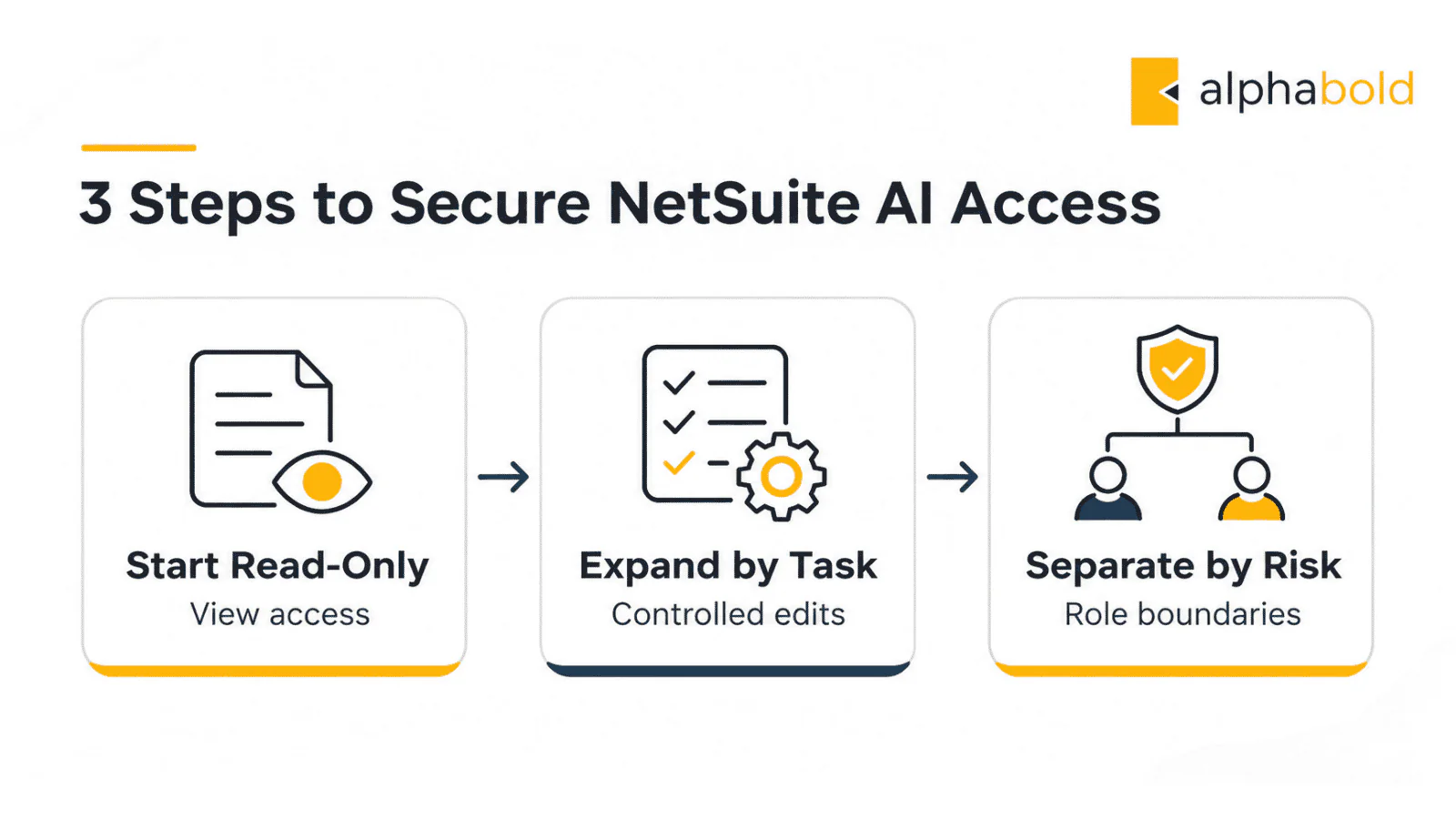
NetSuite least privilege access for agents usually follows three steps:
- Start read-only: Begin with View access while you test an agent and review its logs.
- Expand by task: Add Create or Edit for one record type at a time, once the agent performs reliably.
- Separate by risk: Use different roles for low-risk reporting and for higher-risk tasks such as vendor updates.
NetSuite segregation of duties rules should carry over to AI as well. An agent role that can create a vendor bill should not also approve or pay it. If a role grants access to all three steps, and the available MCP tools and workflows permit those actions, the agent could perform conflicting duties. Separating these permissions helps prevent AI agents from bypassing established financial controls.
Why Do AI Access Controls Matter More After SuiteWorld 2026?
AI access controls matter more as NetSuite expands AI beyond answering questions to supporting business actions. At SuiteWorld on October 26, 2026, Oracle NetSuite announced more than 45 SuiteSkills, industry-specific SuiteAgents, and new agent management capabilities.
These developments reinforce the importance of role-based permissions. External AI assistants connected through the AI Connector Service operate within the connecting user’s permissions and available MCP tools. Native SuiteAgents have their own execution and management controls, making it important to distinguish how each type of agent accesses records and performs actions.
While SuiteSkills and select industry SuiteAgents were introduced for initial availability, SuiteAgent Studio, the SuiteAgent Management Workspace, and Ask Oracle Connectors were announced for future releases. Businesses should review their existing roles, approval rules, and access policies before enabling additional AI capabilities.
For a breakdown of available and upcoming features, see AlphaBOLD’s SuiteWorld 2026 announcements guide.
How Do You Audit NetSuite Permissions Before Connecting AI?
You audit NetSuite permissions by listing every role that can connect to AI, checking what each one can see and change, and reviewing activity logs on a set schedule. These steps give you a practical starting point:
- List roles that can connect to AI. Build a saved search for roles that include the MCP Server Connection permission.
- Compare each role with its task. Check each AI role against the user’s standard role and remove anything the AI task does not use.
- Flag full and sensitive access. Mark any AI role with Full level on transactions, payments, or setup permissions.
- Review execution logs. Check the AI Connector Service execution logs for each relevant integration record. These logs show request time, duration, status, user, and request details. NetSuite retains them for 21 days in production and 7 days in sandbox, so arrange regular exports if your audit cycle runs longer. Where available, review external AI client and MCP server logs alongside NetSuite logs for broader visibility into agent activity.
- Review authorized agents and tools. Oracle’s risks and mitigation guidance recommends periodic reviews of MCP users, roles, the tools you install, namespaces, the agents users have authorized, and consent grants.
NetSuite role access control reviews work best on a fixed schedule, such as once a quarter, and after any change to an agent’s tools or users.
You May Also Like: NetSuite Security and Compliance Guide
How Do You Secure NetSuite AI Integrations Beyond Roles?
You secure NetSuite AI integrations by controlling the AI clients and outside tools that connect, in addition to the roles. Oracle’s FAQ notes that NetSuite cannot control how external AI agents or MCP servers handle tokens or data once that data leaves NetSuite, so NetSuite AI security also depends on what sits outside the system.
- Keep an allow list: Allow only AI clients, MCP servers, and tools your team has reviewed.
- Require confirmations: Prefer clients that ask for confirmation before approvals, payments, deletions, or bulk exports.
- Avoid risky pairings: Carefully assess integrations that combine NetSuite tools with broad-access capabilities such as email, file systems, or browsers. Test these combinations and restrict permissions to reduce the risk of unauthorized data access or disclosure.
- Plan a shutdown path: Document how to turn off an AI role, revoke consent, or remove a tool quickly.
- Check data rules: Oracle states that the AI Connector Service has not been assessed for HIPAA compliance. Do not use it to process electronic protected health information (ePHI) unless your organization has independently established that the use complies with applicable legal requirements.
What Does Tighter AI Access Control Cost?
The cost of implementing NetSuite AI access controls depends on the number of roles, complexity of permissions, testing requirements, and frequency of access reviews. The following example illustrates how an organization might estimate the internal effort involved. These figures are hypothetical planning assumptions, not standard NetSuite implementation costs or AlphaBOLD pricing.
- Initial setup: Four AI roles at about 8 hours each for design and sandbox testing come to 32 hours.
- Ongoing reviews: Quarterly reviews at about 5 hours each add 20 hours per year.
- Total first-year effort: 32 hours plus 20 hours equals 52 hours. At an illustrative blended rate of $150 per hour, that comes to about $7,800.
Organizations should evaluate this investment against the potential operational and financial risks of excessive AI permissions. The appropriate level of investment depends on the sensitivity of the data, the number of connected AI agents, and the business actions those agents can perform.
Review Your NetSuite AI Access Before Agents Go Live
AlphaBOLD helps you audit current roles, design narrow AI roles, and set up a review schedule that fits your workflows.
Request a ConsultationConclusion
AI agents in NetSuite work with the access their roles allow, so your role design decides how much an agent can see and change. When you combine NetSuite role-based permissions with narrow tools, approval steps, and regular log reviews, you can keep AI use inside the same controls that apply to your staff.
Weigh the time that role design and reviews take against the risk of broad access before you expand agents across finance and operations. AlphaBOLD can help you evaluate your current roles, build a business case for AI access controls, and implement a role model that fits your processes.
FAQs
Can we use our existing NetSuite roles for AI, or do we need new ones?
You can use existing non-administrator roles when they have the appropriate permissions. For sensitive or higher-risk AI tasks, we recommend creating narrower custom roles. AlphaBOLD can review your existing permissions and help determine whether additional roles are necessary.
How do you set up NetSuite AI permissions for a finance team?
We start each finance role with read-only access to the records and saved searches the AI task needs. After testing in sandbox, we add Create or Edit access one record type at a time and keep approvals and payments with people.
What happens if an AI agent tries an action its role cannot perform?
NetSuite prevents operations that exceed the connecting role’s permissions. Administrators can review available MCP execution logs for request failures and permission-related errors, although not every rejected action is necessarily recorded as a separate log entry.
How often should we review AI roles and permissions?
We recommend a review at least once a quarter and after any change to an agent’s tools, users, or the apps that connect to it. Because NetSuite keeps execution logs for 21 days in production, we also set up regular log exports for clients with longer audit cycles.
What does AlphaBOLD's NetSuite AI access review include?
Our review lists every role with MCP permissions, checks each AI role against the task it supports, and tests segregation of duties across create, approve, and pay steps. We then share our role design recommendations, a sandbox test plan, and a review schedule.
Explore Recent Blog Posts
Customization & Integration
Customization & Integration

Related Posts

Project Management & Resource Planning