Integrating NetSuite with PayPal: Features, Benefits, Solutions, Costs & Timeline

Table of Contents

Quick Answer

Integrating NetSuite with PayPal connects PayPal sales, refunds, fees, and payouts to the corresponding records in NetSuite, helping finance teams reconcile PayPal deposits with fewer manual data entries. NetSuite’s built-in PayPal Integration feature supports PayPal as a payment method in Commerce web stores. In contrast, payout reconciliation and fee posting typically require a prebuilt connector or a custom integration.

Introduction

PayPal payments and bank transfers do not always occur on a one-to-one basis. Depending on the merchant’s account configuration, funds may be transferred individually or in batches, and processing fees, refunds, disputes, and currency conversions can affect the available balance. As a result, a single bank deposit may represent multiple transactions. Without that detail in NetSuite, the finance team rebuilds each deposit by hand, which delays month-end close, leaves undeposited funds balances that are hard to explain, and makes the true cost of PayPal difficult to report.

Integrating NetSuite with PayPal addresses this by moving PayPal transaction and payout data into NetSuite in a structured way.

What Does Integrating NetSuite with PayPal Actually Include?

Integrating NetSuite with PayPal includes two separate processes: accepting PayPal payments and accounting for PayPal settlements. NetSuite’s native feature is mainly designed for the first.

  • Payment acceptance: NetSuite’s PayPal Integration feature lets a Commerce web store offer PayPal at checkout through PayPal Express Checkout, and NetSuite OneWorld can assign a separate PayPal account to each subsidiary. PayPal now lists Express Checkout as a legacy integration, so new projects should confirm the long-term approach before relying on it.
  • Settlement accounting: Recording each payout as a bank deposit, splitting fees into expense accounts, and matching refunds and disputes is handled by connectors or custom flows rather than by the native checkout feature.

If PayPal payments come from invoices, marketplaces, or ecommerce platforms such as Shopify, the native feature does not apply; an integration layer is required.

Which PayPal NetSuite Integration Options Are Available?

There are four common approaches. The right one depends on where PayPal payments originate and how much accounting detail the business needs.

Option What it covers Best fit Main limitation
Native PayPal Integration feature
PayPal checkout, capture, and refunds for Commerce web stores
Businesses selling through SuiteCommerce or Site Builder
Not designed to build bank deposits from payouts or post fee detail
Pre-built connector (iPaaS app)
Payments, refunds, fees, and payout-to-deposit reconciliation
Mid-market teams with steady PayPal volume
Subscription cost and vendor-defined limits
Accounting sync app
Summarized journal entries by day or by payout
Lower volume or simpler entity structures
Less transaction-level detail for audits
Custom integration (SuiteScript and PayPal APIs)
Any mapping the business defines, including multi-entity routing
Complex B2B, subscription, or multi-subsidiary models
Higher build cost and ongoing maintenance

Choose the Right PayPal Integration for NetSuite

AlphaBOLD helps businesses compare integration options against their PayPal volume, entity structure, and reporting needs.

Request a Consultation

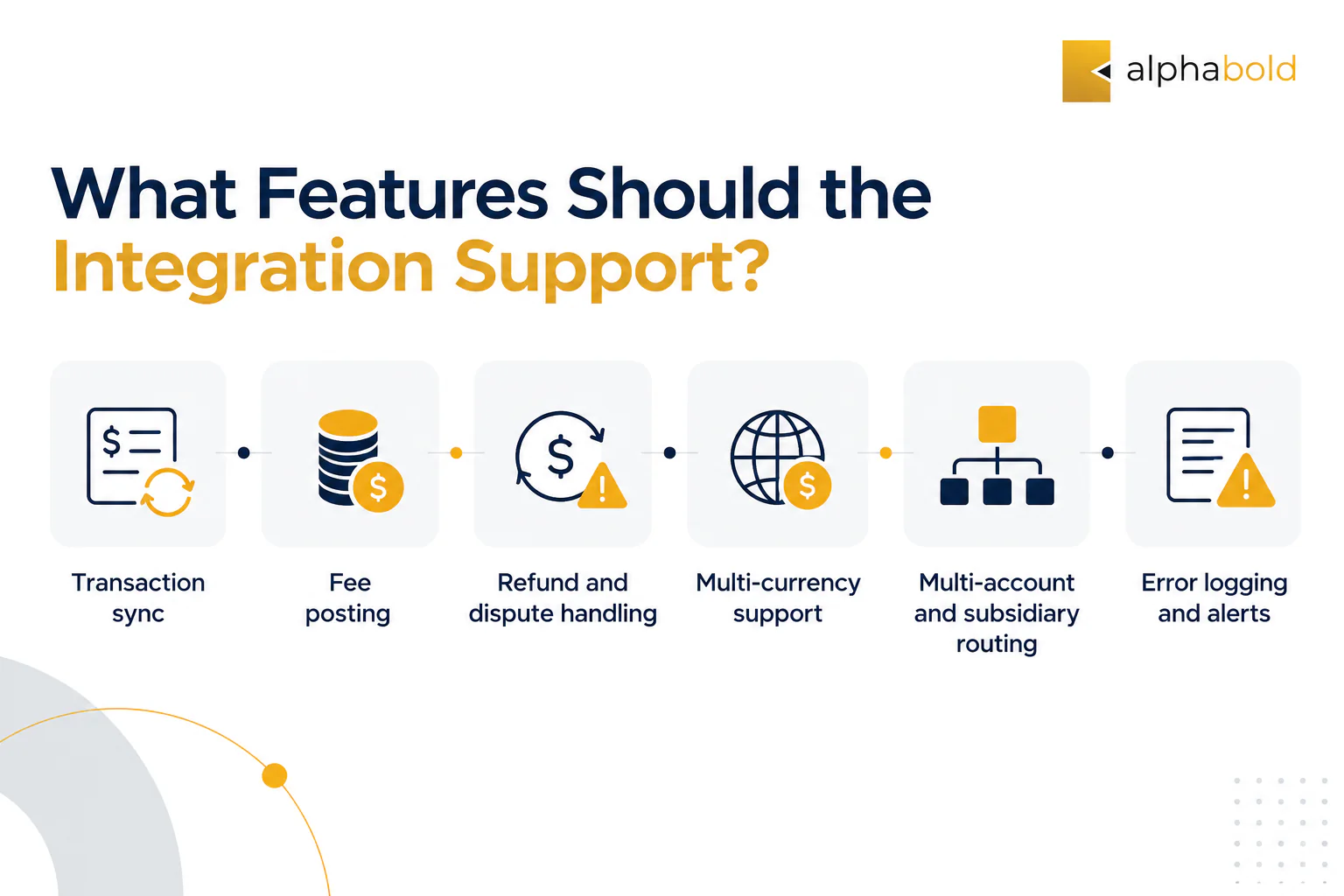
What Features Should the Integration Support?

NetSuite and PayPal integration should support the full payment lifecycle, including initial sales, refunds, fees, and errors.

  • Transaction sync: Transfers PayPal payments into NetSuite as customer payments, cash sales, or deposits, which helps track collected cash against open invoices.
  • Fee posting: Records PayPal fees to a dedicated expense account, which helps the team report processing costs by payment product.
  • Refund and dispute handling: Creates refunds, credit memos, or chargeback entries when PayPal reverses a payment, which supports accurate revenue balances.
  • Multi-currency support: Records foreign-currency transactions by configured rules, which helps reduce exchange variances.
  • Multi-account and subsidiary routing: Maps each PayPal account to the correct subsidiary and bank account, which supports consolidated reporting in NetSuite OneWorld.
  • Error logging and alerts: Flags failed records so the team can correct them before period close.
  • The capabilities available depend on the connector or custom integration selected. Some solutions focus on payout reconciliation using existing NetSuite records, while others also support creating and updating payment and refund transactions.
Minimalist AlphaBOLD infographic highlighting six NetSuite PayPal integration features: transaction sync, fee posting, refunds, multi-currency support, subsidiary routing, and error alerts

How Does NetSuite PayPal Integration for Bank Deposits Work?

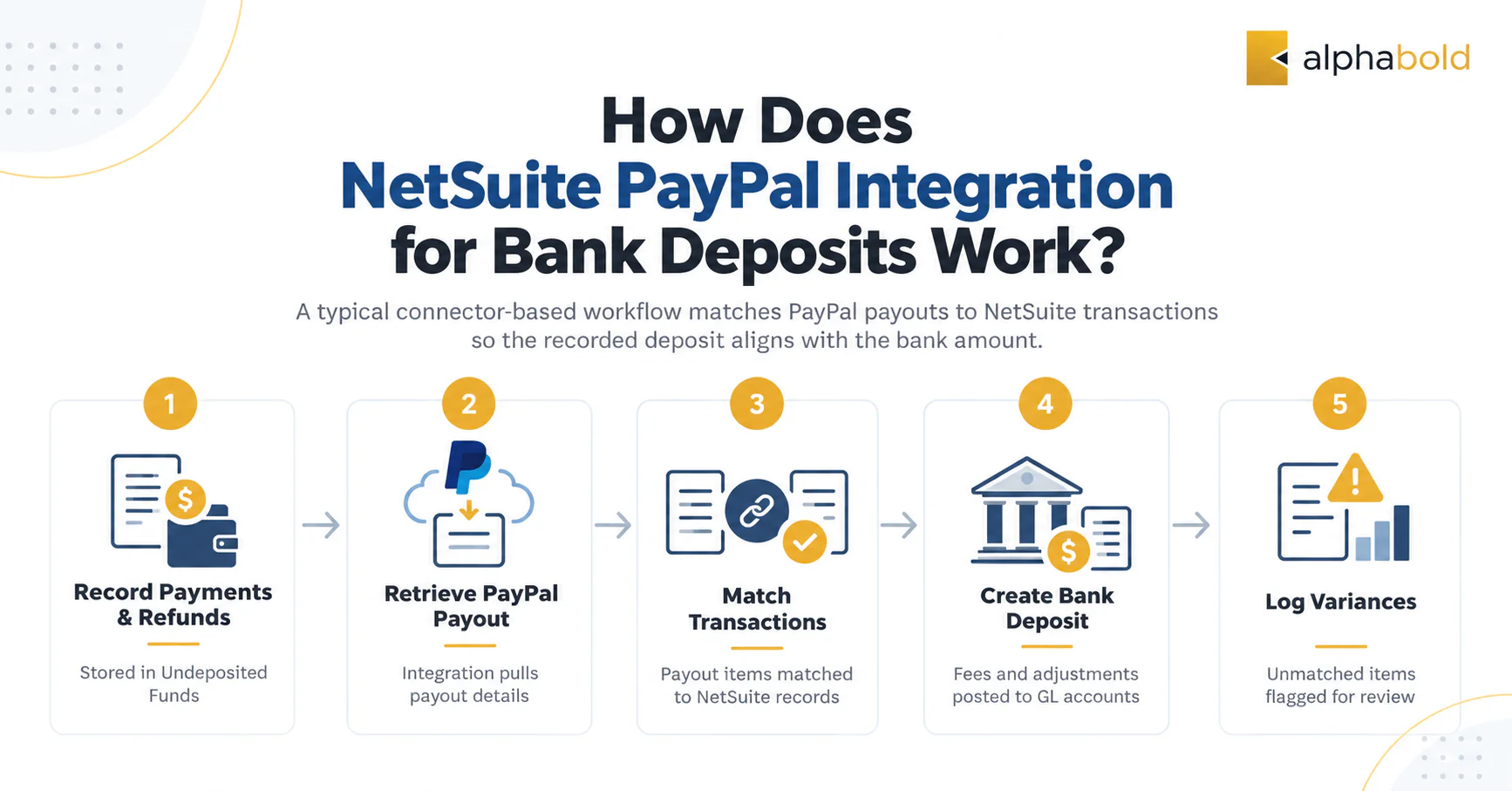
A common approach to NetSuite PayPal integration for bank deposits is to match PayPal payouts to corresponding transactions in NetSuite. Depending on the connector and accounting configuration, payments, refunds, and fees are reconciled so the recorded deposit matches the amount received in the bank account. A typical connector-based workflow follows these steps:

  1. Payments and refunds are recorded in NetSuite and held in the Undeposited Funds account.
  2. When PayPal transfers funds to the bank, the integration retrieves that payout’s transaction details.
  3. Each PayPal transaction is matched to its NetSuite payment or refund.
  4. A bank deposit is created, with fees and adjustments posted as separate lines to the selected GL accounts.
  5. Unmatched items are logged as variances for the team to review.

You May Also Like: Shopify Integration with NetSuite: Key Methods and Best Fit

Five-step NetSuite PayPal bank deposit reconciliation workflow, covering payments, payouts, transaction matching, deposits, and variance tracking

How Much Does Integrating NetSuite with PayPal Cost?

The total cost combines PayPal’s transaction fees, which apply with or without an integration, and the integration software, implementation, and maintenance, which are quoted per project. The PayPal fees below reflect published US merchant rates as of October 2026. Actual rates may vary by country, payment method, and merchant agreement.

Cost component What it includes What drives it
PayPal Checkout and Pay with Venmo
3.49% plus a fixed fee of $0.49 per US domestic transaction
Payment product and order value
PayPal Pay Later
4.99% plus a fixed fee of $0.49 per transaction
Pay Later usage
International transactions
An additional 1.50% on international commercial transactions
Cross-border sales volume
Currency conversion
3.00% conversion spread for applicable transactions; other conversions may have different rates
Currencies received and converted
Disputes
$15 standard dispute fee, or $30 for high-volume dispute merchants
Dispute rate
Integration software
Connector or integration platform license
Vendor, number of flows, and transaction volume
Implementation
Configuration or build, testing, and go-live
GL design, PayPal accounts, and subsidiaries
Ongoing maintenance
Monitoring, error handling, and updates
API changes and new accounts

PayPal does not return original fees on refunds and charges dispute fees separately, so both should post to their own expense accounts in NetSuite.

How Long Does a PayPal NetSuite Integration Take?

As a general planning estimate, NetSuite PayPal integrations using pre-built connectors may take three to six weeks, while custom or multi-entity implementations may require six to ten weeks or longer. Actual timelines depend on integration complexity, transaction volume, data mapping requirements, and testing.

Phase Estimated duration Key output
Discovery and GL design
1 to 2 weeks
Account mapping for deposits, fees, refunds, and currency variances
Configuration or build
1 to 4 weeks
Configured connector flows or custom scripts
Sandbox testing
1 to 2 weeks
Test payouts matched to bank statement amounts
Go-live and support
1 to 2 weeks
Monitored first payout cycles in production

What Are NetSuite PayPal Integration Best Practices?

The most useful NetSuite PayPal integration best practices focus on accounting design before configuration.

  1. Use a PayPal clearing account rather than posting payouts directly to the operating bank account, so funds in transit remain visible.
  2. Map PayPal transaction event codes to GL accounts in advance, including fees, chargebacks, holds, and withdrawals.
  3. Separate fee accounts by PayPal product when cost reporting matters, since Checkout and Pay Later rates differ.
  4. Plan for deposit limits on large payouts. In Celigo’s PayPal reconciliation app, a single NetSuite deposit supports up to 2,000 PayPal transactions. A payout containing 10,500 transactions would therefore be split into six deposits, according to Celigo’s documentation.
  5. Align the payout time window with your PayPal account’s bank transfer time, so transactions do not fall into the wrong deposit.
  6. Assign one PayPal account per subsidiary in OneWorld and confirm currency handling before go-live (Oracle NetSuite).
  7. Test with real payout data in a sandbox, including refunds and disputes, before switching on production flows.
  8. Name an owner to review errors and variances weekly.

You May Also Like: NetSuite AI Connector Service: How It Works in 2026

Plan Your NetSuite PayPal Integration

AlphaBOLD helps teams design GL mapping, select a connector or custom approach, and estimate implementation costs.

Request a Consultation

Conclusion

PayPal settles funds as net, batched payouts, so finance teams rebuild deposits by hand when the systems are not connected. Integrating NetSuite with PayPal can support faster reconciliation and clearer fee reporting, provided the GL design and data mapping are planned carefully, and those benefits should be weighed against fees, subscriptions, implementation, and maintenance.

AlphaBOLD can help you evaluate options, build a business case, and implement the integration through its NetSuite ERP integration services. You can get in touch with our team, and we will get back to you with answers to your questions.

FAQs

Does NetSuite have a built-in PayPal integration?

Yes. NetSuite’s PayPal Integration feature supports PayPal as a payment method in Commerce web stores, including Express Checkout. It does not reconcile PayPal payouts to bank deposits on its own, so most businesses add a connector to do so.

Is NetSuite's native PayPal integration still supported?

Yes, it still works, but it is built on PayPal Express Checkout, which PayPal now lists as a legacy integration and recommends upgrading to PayPal Checkout on its REST APIs. PayPal has not published an end date, so businesses planning new work should factor this into the integration choice.


How are PayPal fees recorded in NetSuite?

PayPal fees are usually posted as separate lines on the bank deposit or as journal entries to an expense account, ideally split by payment product.

Can You Set Up a NetSuite PayPal Integration for Bank Deposits Without Middleware?

It is possible through a custom build using SuiteScript and PayPal’s APIs. This gives full control over mapping but requires ongoing maintenance as either platform changes.

Do Braintree and PayPal use the same NetSuite integration?

No. Braintree, a PayPal service, connects through a SuitePayments payment processing profile and its own SuiteApp, while PayPal Checkout uses NetSuite’s PayPal Integration feature or a separate connector.

Explore Recent Blog Posts

270x330

Related Posts

Receive Updates on Youtube
Copyright © 2025 AlphaBOLD | NetSuite Solution Provider | All Rights Reserved | Privacy Policy