

Table of Contents
A NetSuite environment can remain functional while gradually becoming harder to manage. New workflows are added, integrations multiply, roles change, scripts accumulate, reporting requirements evolve, and teams create workarounds to keep processes moving.
A NetSuite health check provides a structured way to review whether the current ERP environment still supports the way your business operates today.
Quick answer: A NetSuite health check reviews configuration, customizations, scripts, permissions, integrations, data quality, reporting, performance, feature utilization, and system governance. The goal is to identify where risk, unnecessary complexity, technical debt, or process gaps have accumulated and determine what should be addressed first.
What Is a NetSuite Health Check?
A NetSuite health check is a structured assessment of your current ERP environment.
It is not the same as immediately starting an optimization project or reimplementing NetSuite. Instead, the assessment establishes how the system is currently configured, where problems or dependencies exist, and which areas require further attention.
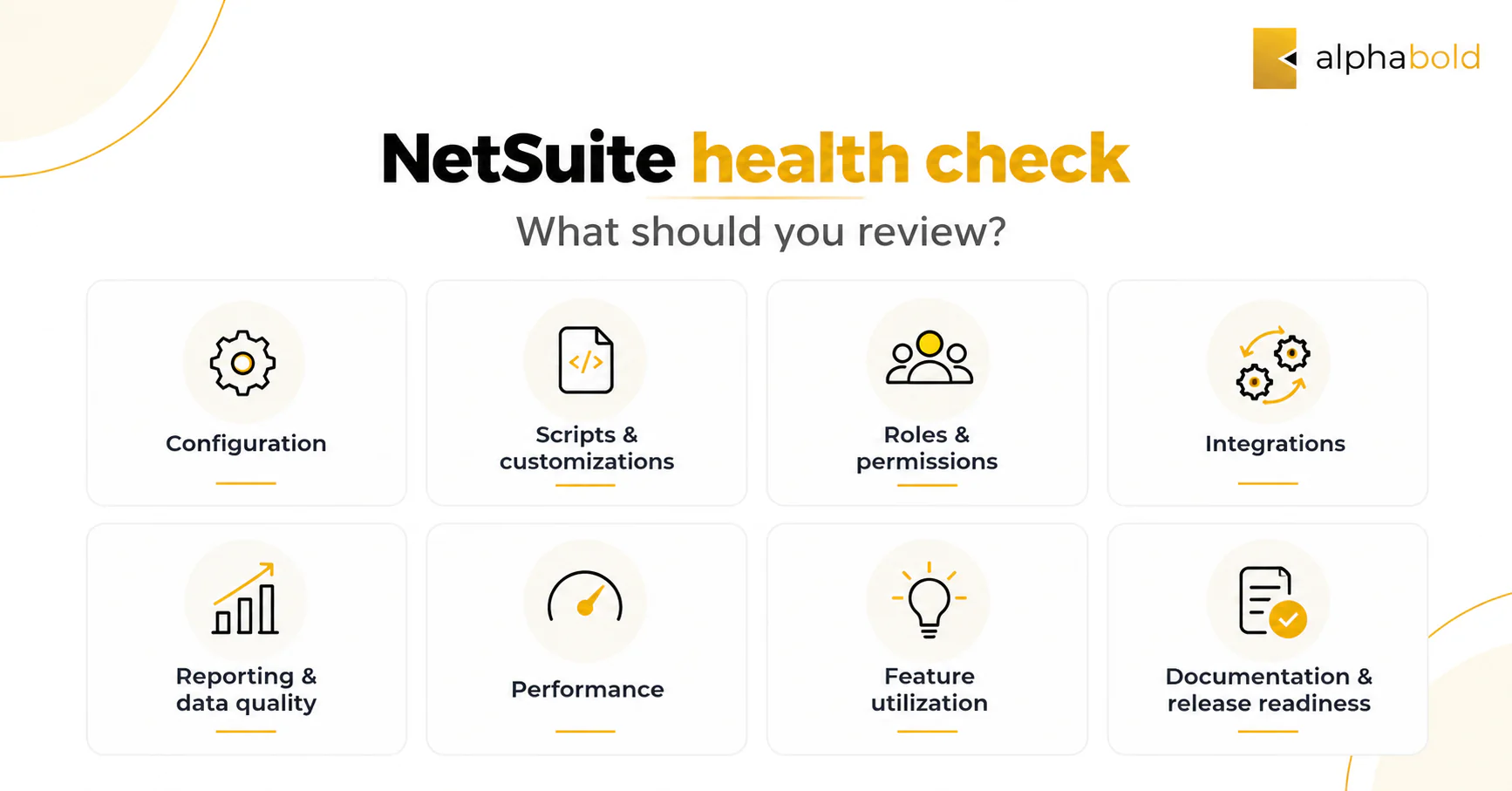
Depending on the environment, a review may examine:
- Configuration and workflows
- SuiteScripts and customizations
- Roles and permissions
- Integrations
- Reporting and data quality
- System performance
- Feature utilization
- Documentation and governance
- Release readiness
A more formal NetSuite optimization audit can then be used to evaluate configuration gaps, manual tasks, inefficient processes, misconfigured functionality, and other areas that may require improvement.
When Does a NetSuite Health Check Make Sense?
A health check does not need to be triggered by a major system failure. In many cases, it is most useful around periods of change or when the organization needs a clearer understanding of how the ERP environment has evolved.
A NetSuite health check may be particularly useful:
- Before or after a major business change, such as an acquisition, restructuring, new subsidiary, or operating-model change
- When responsibility for NetSuite changes hands and a new administrator or team needs a documented view of the environment
- After several years of scripts, workflows, integrations, and configuration changes
- Before a significant optimization initiative, so decisions are based on a structured assessment rather than individual support tickets
- When recurring issues span several parts of the environment and isolated fixes are no longer revealing the underlying cause
These situations do not automatically mean NetSuite needs major remediation. They indicate that the organization may benefit from understanding the environment as a whole.
If you are looking specifically for operational warning signs, Further reading: 10 Signs Your NetSuite ERP Needs Optimization Now.
What Should a NetSuite Health Check Review?
The most useful assessments look at the ERP as a connected environment rather than reviewing isolated support tickets one at a time.
1. Configuration and Business Process Alignment:
NetSuite is typically configured around a specific version of how the business operates.
But business processes change.
Companies introduce new approval structures, subsidiaries, reporting requirements, product lines, teams, or operating models. The ERP configuration may not always change at the same pace.
A health check should review whether current:
- Forms
- Approval workflows
- Transaction processes
- Record structures
- Saved searches
- System preferences
- Financial and operational workflows
still reflect the way teams work today.
The goal is not to redesign every process. It is to identify areas where the configured environment and the current operating model have drifted apart.
2. SuiteScripts, Workflows, and Customization Dependencies:
Customizations are often necessary in NetSuite environments, particularly when organizations have specialized business requirements.
The risk comes when those customizations accumulate without clear ownership or documentation.
A health check should answer questions such as:
- Which scripts and workflows are currently active?
- What business requirement does each customization support?
- Who owns it?
- What other processes depend on it?
- Is the customization still necessary?
- Does it duplicate functionality that is now available elsewhere?
- Are multiple customizations addressing the same underlying requirement?
Over time, unclear dependencies can make relatively simple system changes harder to assess.
The review should therefore focus not simply on the number of customizations, but on whether the organization understands the purpose, ownership, and dependencies of what it has built.
3. Roles, Permissions, and Access Governance:
Access requirements rarely remain static.
Employees change roles, administrators come and go, integrations require access, new teams are added, and permissions are adjusted to solve immediate requirements.
A health check should therefore review whether:
- Roles still match current responsibilities
- Former responsibilities have left behind unnecessary access
- Administrator permissions are being used appropriately
- Similar or duplicate roles have accumulated
- Integration roles and permissions are appropriate for the data and functions each integration requires
- Permission changes are documented and governed
The objective is not simply to reduce access. It is to ensure that access remains aligned with current responsibilities and business processes.
Further reading: NetSuite Security and Compliance Guide explores role management, permissions, segregation of duties, and access governance in more detail.
4. Integrations and Data Movement:
NetSuite rarely operates alone.
CRM platforms, ecommerce systems, banking tools, payroll solutions, warehouse applications, and other systems may all exchange data with the ERP.
A health check should examine how those connections are functioning and whether employees are compensating for gaps manually.
Questions may include:
- Which applications currently exchange data with NetSuite?
- Are integrations reliable?
- Where does duplicate data exist?
- Are employees copying data between systems?
- Which system is the source of truth for each key dataset?
- Are integration errors routinely resolved manually?
- Have integrations remained necessary as processes changed?
Not every process needs to reside inside NetSuite. What matters is that the relationship between systems is intentional.
A documented NetSuite integration strategy can help clarify how applications should connect and where data should be managed.
5. Reporting and Data Quality:
Reporting issues can be a symptom of several different problems.
The underlying issue may sit in:
- Data entry
- Record structure
- Reporting logic
- Saved searches
- Integrations
- Permissions
- KPI definitions
- Process inconsistencies
A health check should investigate whether reports intended to measure the same business activity reconcile with one another and whether teams trust the information being produced.
This becomes particularly important when finance or operations teams repeatedly export data, reconcile reports manually, or maintain separate reporting models outside the ERP.
PwC’s 2026 Digital Trends in Operations Survey found that 87% of surveyed operations and supply chain leaders said poor data quality affected their organization’s ability to realize value from digital initiatives, while 89% said technology investments had not fully delivered expected results. The research was not NetSuite-specific, but it reinforces how strongly data quality can affect the value organizations receive from business technology.
If spreadsheets have become part of the reporting process rather than an occasional analysis tool, further reading: Eliminating Spreadsheet Dependency in Financial Operations.
Not Sure Which NetSuite Issues Need Attention First?
AlphaBOLD can help assess your current NetSuite environment, identify high-priority gaps, and separate quick fixes from issues that require deeper optimization.
Request a Consultation6. Performance and Technical Bottlenecks:
Not every performance issue has the same cause.
Slow searches, scripts, transaction processing, dashboards, or integrations may result from different configuration or technical decisions.
A health check can combine user-reported problems with NetSuite’s own performance data to identify recurring issues across scripts, saved searches, integrations, record pages, and other processes.
Areas worth reviewing can include:
- Saved searches
- Script behavior
- Workflow complexity
- Integration activity
- Frequently used processes
- Areas where users consistently experience delays
- Customizations associated with performance problems
The objective is to distinguish isolated slowdowns from broader design or configuration issues.
7. Feature Utilization and User Adoption:
A health check should also consider how employees actually use NetSuite.
Low adoption does not always mean users need additional training. Sometimes employees avoid a workflow because it is unnecessarily complex, does not reflect their current process, or requires information they do not have.
Useful questions include:
- Which processes are routinely completed outside NetSuite?
- Where do users create their own trackers?
- Are relevant native features being bypassed?
- Are purchased modules actively used?
- Do customizations still provide value?
- Are users aware of the capabilities available to them?
The aim is not to force every activity into NetSuite. It is to determine whether system design, process design, adoption, or training is creating unnecessary friction.
8. Documentation, Ownership, and Release Readiness:
A healthy environment should be understandable to more than one person.
That means organizations should know:
- Which customizations support critical processes
- Who owns key workflows
- Which integrations require monitoring
- What needs to be tested during a NetSuite release
- Where important configuration decisions are documented
- Who approves system changes
Testing before a NetSuite release is normal.
The warning sign is when the team does not know what needs to be tested, which processes depend on a customization, or who is responsible for validation.
Clear ownership reduces the amount of investigation required every time the environment changes.
For organizations establishing stronger post-go-live governance, further reading: Post-Go-Live: NetSuite ERP Support.
How Should You Prioritize NetSuite Health Check Findings?
Not every finding deserves the same response.
Once issues have been identified, they should be prioritized according to business impact, risk, frequency, dependency, and the effort required to address them.
A practical way to group findings is:
- Immediate risks: Access, compliance, data integrity, or failures affecting business-critical processes
- Operational friction: Recurring manual work, reporting problems, integration failures, or performance bottlenecks
- Technical debt: Poorly documented or redundant scripts, workflows, customizations, and dependencies
- Improvement opportunities: Native functionality, automation, or process changes that could simplify the environment
This helps prevent a health check from becoming a long list of system observations with no clear direction.
Some findings may require immediate action. Others may have limited business impact and can reasonably remain unchanged.
The goal is to identify which issues create meaningful risk or operational cost and which improvements are worth prioritizing.
Does a NetSuite Health Check Mean You Need to Reimplement NetSuite?
No.
A health check is a diagnostic exercise.
The findings may point to relatively targeted changes such as:
- Configuration corrections
- Workflow adjustments
- Permission cleanup
- Reporting improvements
- Integration fixes
- Removal of obsolete customizations
- Better documentation
- Additional training
Other environments may require more extensive optimization.
The important point is that reimplementation should not be assumed simply because problems exist. The assessment should establish the scale and source of those problems first.
How Often Should You Review Your NetSuite Environment?
There is no universal review schedule for every NetSuite customer.
The appropriate timing depends on how complex the environment is and how quickly the organization changes.
A review may be particularly useful after:
- Major business expansion
- New subsidiaries or legal entities
- Significant process changes
- Multiple new integrations
- Several years of customization
- ERP administration changes
- Recurring reporting or data issues
- Acquisition, restructuring, or major operational change
An event-driven review is often more useful than applying an arbitrary calendar rule.
Conclusion
A NetSuite health check is most useful when it helps you understand the environment as a whole, not just the individual issues users are reporting. By reviewing configuration, customizations, integrations, permissions, reporting, performance, and governance together, you can identify where complexity has accumulated and which problems deserve attention first.
The goal is not to change everything. It is to separate isolated issues from broader system concerns, prioritize the areas with the greatest business impact, and make more informed decisions about optimization, support, or remediation.
Get a Clearer View of Your NetSuite Environment
AlphaBOLD can assess your current NetSuite environment, identify gaps and dependencies, and develop practical recommendations based on your business processes and priorities.
Request a ConsultationFAQs About NetSuite Health Checks
What is included in a NetSuite health check?
A NetSuite health check can include configuration, workflows, SuiteScripts, customizations, roles, permissions, integrations, reporting, data quality, performance, feature utilization, system documentation, and governance. The exact scope should reflect the complexity of the environment and the issues the organization wants to investigate.
Is a NetSuite health check the same as a NetSuite optimization project?
No. A health check identifies issues, dependencies, risks, and improvement opportunities. Optimization is the work undertaken afterward to address selected findings. A health check can therefore help determine whether a larger optimization initiative is necessary.
Can a NetSuite health check identify technical debt?
Yes. A review can identify outdated or poorly documented customizations, overlapping workflows, unclear dependencies, redundant integrations, legacy configuration decisions, and other forms of accumulated system complexity.
Does a NetSuite health check require downtime?
A NetSuite health check does not inherently require production downtime. Much of the assessment can involve reviewing configuration, workflows, scripts, integrations, performance data, and documentation. Any downtime associated with subsequent remediation would depend on the specific changes being implemented.
Explore Recent Blog Posts




Related Posts

Project Management & Resource Planning