Which ERP Processes Should You Optimize First?

Table of Contents

Quick Answer

ERP process optimization should start with workflows where friction has the greatest effect on cash flow, operating costs, service, controls, or employee time. For most businesses, the first areas worth reviewing include financial close, order-to-cash, procure-to-pay, inventory, reporting, and approval or exception workflows. Prioritize these processes based on business impact, transaction volume, manual effort, cycle time, and error or exception rates. The goal is not to optimize every ERP process at once. It is to identify where improvements to configuration, workflows, integrations, automation, or native ERP functionality can deliver measurable business value first.

Introduction

An ERP can be technically functional while the processes running through it remain inefficient. Teams may still rely on spreadsheets for reconciliation, chase approvals through email, manually move data between systems, or work around configurations that made sense when the ERP was first implemented.

If these problems sound familiar, the first question is not simply whether your ERP needs optimization. It is which processes deserve attention first.

If you are still determining whether your system needs improvement at all, these 10 signs your NetSuite ERP needs optimization can help identify common warning signs.

How Should You Prioritize ERP Process Optimization?

Do not start with the process generating the most complaints or the newest NetSuite feature you could implement. Start with business impact.

McKinsey’s 2026 ERP research recommends identifying important problems at the business-domain level and connecting individual workflows to measurable outcomes such as cost, margin, service levels, and working capital.

A practical ERP process optimization assessment should consider six factors:

  • Business impact: Does the process affect revenue, cash flow, operating cost, customer service, or compliance?
  • Manual effort: How much time is spent entering, checking, reconciling, or chasing information?
  • Transaction volume: How frequently does the process run?
  • Errors and exceptions: How often does work fall outside the standard ERP workflow?
  • Cycle time: Are delays affecting customers, suppliers, finance, or downstream teams?
  • Feasibility: Can the problem realistically be addressed through process design, configuration, integration, automation, or training?

Processes with high business value and high friction usually deserve the closest attention.

A workflow performed 500 times a month can also represent a greater opportunity than an obviously frustrating process that happens only a few times a year. Prioritization should therefore consider cumulative effort, not just individual pain points.

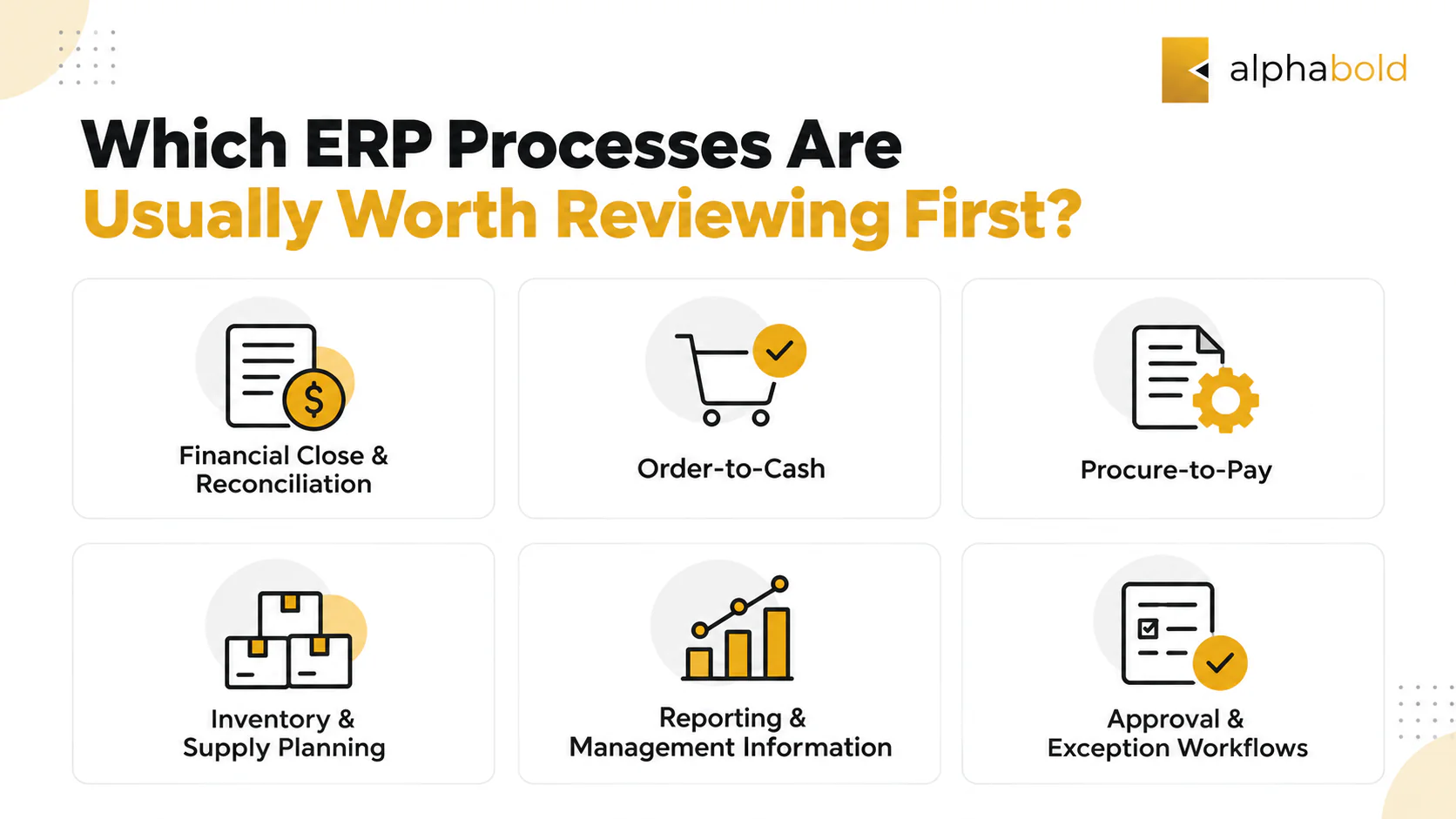
Which ERP Processes Are Usually Worth Reviewing First?

There is no universal order. The following processes, however, are often good places to investigate because they sit close to cash, operational capacity, customer delivery, and financial control.

Which ERP Processes Are Usually Worth Reviewing First

1. Financial Close and Reconciliation:

Financial close can appear healthy simply because the books eventually close on time. The better question is how much work it takes to get there.

Look for repeated spreadsheet reconciliations, manual journal entries, late adjustments, unclear task ownership, and finance teams spending significant time investigating differences between systems.

Useful measures include:

  • Days required to close
  • Manual journals and adjustments
  • Reconciliation exceptions
  • Hours spent preparing and validating close data

If the process consistently reaches completion only through manual intervention, there may still be a significant optimization opportunity.

2. Order-to-Cash:

Order-to-cash directly connects ERP performance with revenue collection and customer experience.

Review how orders move from entry through fulfillment, billing, payment, and collections. Common signs of friction include duplicate data entry, manual credit approvals, unresolved order holds, delayed invoices, manual cash application, and collection activity being managed outside the ERP.

Useful metrics include order-to-invoice time, billing accuracy, days sales outstanding, dispute resolution time, and the percentage of orders requiring manual intervention.

3. Procure-to-Pay:

High transaction volumes make relatively small inefficiencies expensive over time.

Look at purchase requests, approvals, purchase orders, invoice entry, matching, exceptions, and payments. Email-based approvals, repetitive invoice entry, recurring matching issues, and employees chasing information manually are all worth investigating.

The aim is not simply to automate each step. First determine why those manual touches exist and whether they provide necessary control or compensate for a poorly designed workflow.

4. Inventory and Supply Planning:

Inventory processes have consequences across purchasing, fulfillment, cash flow, and customer service.

Common optimization signals include frequent stockouts, excess inventory, manual replenishment decisions, inaccurate availability, repeated inventory adjustments, backorders, and planning activity occurring outside the ERP.

Track measures such as inventory accuracy, stockout frequency, backorders, inventory turns, and manual adjustments to identify where the process is creating the greatest operational impact.

5. Reporting and Management Information:

Having dashboards does not necessarily mean the reporting process is efficient.

Look at what happens before leadership receives a number it trusts. Are employees exporting saved searches into Excel? Are several reports manually combined? Are teams reconciling different versions of the same KPI each month?

Measure the time required to prepare recurring reports, the number of manual exports and reconciliations involved, and how frequently reports require corrections.

The optimization opportunity may be in the process that produces the report rather than the report itself.

6. Approval and Exception Workflows:

Standard workflows often receive the most attention during ERP design, but exceptions can reveal some of the biggest inefficiencies.

Review what happens when an invoice does not match a purchase order, an order goes on hold, an approval exceeds a threshold, or inventory is unavailable.

If the process leaves NetSuite and continues through email, spreadsheets, Teams messages, or verbal approvals, investigate why.

Do not assess only the happy path. Review what happens when the process breaks.

Not Sure Which ERP Processes Should Come First?

AlphaBOLD can help you identify where manual effort, delays, exceptions, configuration gaps, and underused NetSuite capabilities are creating the most business friction, then prioritize improvements based on business value.

Request a Consultation

Should You Automate an ERP Process Before You Optimize It?

Usually, the process should be understood and simplified first.

Automating an inefficient workflow can simply make unnecessary steps happen faster. Before adding automation or custom development, ask whether each step is needed, whether the process is standardized, and whether existing NetSuite functionality can already handle the requirement.

A useful sequence is:

Simplify → Standardize → Configure → Integrate → Automate → Customize where justified

This is particularly important in NetSuite environments that have accumulated scripts and workflows over several years. As NetSuite adds native capabilities, older customizations may duplicate functionality that the platform can now handle more simply.

AlphaBOLD’s guide to going native and decustomizing NetSuite explains when replacing unnecessary customizations with standard functionality can reduce complexity and maintenance.

ERP optimization should not automatically become a customization project.

What Should You Review Before Optimizing NetSuite?

Once priority processes have been identified, the next step is understanding why they are inefficient.

A thorough NetSuite review should look at the process from several angles:

  • Process design: Are unnecessary steps or handoffs built into the workflow?
  • Configuration: Does NetSuite still reflect the way the business operates today?
  • Native functionality: Is existing NetSuite functionality being underused?
  • Customizations: Are scripts and workflows still necessary and working as intended?
  • Integrations: Where is information being manually moved between systems?
  • Data: Are inconsistent records or structures creating downstream work?
  • Reporting: How much manipulation happens before users trust the information?
  • User behavior: Are employees working around the ERP instead of through it?
  • Controls: Are approval rules, roles, and exceptions working properly?
  • Value: Will fixing the issue justify the time, cost, and disruption involved?

The goal should not be to produce the longest possible enhancement list. A useful ERP optimization roadmap separates improvements that can create meaningful business value from changes that are unlikely to justify the effort.

Optimization also continues after implementation. Establishing baseline KPIs, reviewing real user behavior, and maintaining a prioritized enhancement backlog are particularly important once a system is in daily use. Our guide to NetSuite post-go-live support covers how that improvement cycle can be structured after launch.

Start ERP Optimization Where the Business Feels It Most

ERP process optimization works best when priorities come from business outcomes rather than feature availability.

Start with workflows where delays, manual effort, exceptions, errors, or poor process design are affecting cash, cost, service, or control. Measure the current process, identify the source of the friction, and then determine whether the appropriate response is process redesign, NetSuite configuration, integration, automation, training, or targeted customization.

Just as importantly, recognize when a process is working well enough to leave alone.

Build a Practical NetSuite Optimization Roadmap

AlphaBOLD can review your NetSuite workflows, configuration, integrations, reporting, and customizations to identify which improvements should come first and which may not justify the effort.

Request a Consultation

Conclusion

ERP process optimization is most effective when it starts with measurable business friction, not with a list of available features. Focus first on workflows where delays, manual effort, exceptions, or poor process design are affecting cash flow, cost, service, or control.

From there, determine whether the right response is process redesign, NetSuite configuration, integration, automation, training, or targeted customization. The goal is not to change everything. It is to improve the processes where better ERP performance can create the clearest business value.

FAQs

1. How do you know which ERP process should be optimized first?

Start with processes that combine high business impact with high friction. Look for workflows with high transaction volumes, repeated manual work, long cycle times, frequent exceptions, rework, or a direct effect on cash flow, customer service, inventory, or financial controls. Recent ERP trends consistently point to prioritizing the process over the technology itself. For NetSuite users, good candidates often include financial close, procure-to-pay, order-to-cash, inventory, reporting, and approval workflows.

2. How can you tell if the problem is your ERP or your business process?

Trace the workflow from beginning to end before assuming the ERP itself is the problem. A recurring issue may come from process design, inaccurate data, configuration, permissions, integrations, manual workarounds, or user practices, rather than a limitation in the ERP platform.

3. Should you automate an ERP process before optimizing it?

Usually, no. First map the existing workflow, remove unnecessary steps, standardize the process, and determine why exceptions occur. Then decide which repetitive, rule-based steps are worth automating.

Explore Recent Blog Posts

270x330

Related Posts

Receive Updates on Youtube
Copyright © 2025 AlphaBOLD | NetSuite Solution Provider | All Rights Reserved | Privacy Policy